


Build a Beat Pack & Save More Build Your Pack
Producers: Record Beats to MP3 at 320 kbps With Web DAWs
Producer exporting beat from browser DAW

Producers: Record Beats to MP3 at 320 kbps With Web DAWs

The fastest, highest-quality way to move a beat into MP3 is to bounce a lossless mix from your project and encode it afterward, or export MP3 directly from a browser-based studio when speed matters more than archival perfection. Aim for 192 to 320 kbps. Convert from a lossless source whenever one exists. A desktop DAW gives you the most control; a browser DAW like BandLab or Audiotool gets you there in minutes with far less setup.


TL;DR:

  • Export from a lossless source whenever possible, using a desktop DAW for the best control and quality.
  • Set your master peaking between minus 1 and minus 3 dBFS to prevent clipping during export.
  • Use a bitrate of 192 to 320 kbps, with CBR preferred for reliable playback and DJ compatibility.
  • Always tag your MP3 files with metadata like title, artist, and BPM before distribution.
  • When in a hurry, buying pre-made beats in MP3 or WAV formats can save time and ensure quality without exporting or converting.

Tellingbeatzz
Start With a Finished Beat
Tellingbeatzz offers rap beats, hip hop instrumentals, and type beats for artists and songwriters who need inspiration without exporting.

Table of Contents

Quick Methods at a Glance for Recording to MP3 Beat Workflows

Every method trades some fidelity for convenience, and knowing which trade you’re making saves hours of second-guessing. A beat destined for commercial release deserves a different path than a podcast intro you need in the next ten minutes.

  • Desktop DAW export: Best for final masters and stems. Expect several minutes including mixdown, sample rate checks, and encoding. Tools like Pro Tools, Logic Pro, and Ableton Live dominate this tier.
  • Browser-based recording and editing: Best for quick collaboration or when you don’t own production software. BandLab lets you record, mix, and export a project in under 10 minutes with no installation.
  • Mobile recording, then convert: Best for capturing an idea on the move. Record in the highest native quality your phone allows, then convert once you’re at a computer.
  • Online or local converters: Best when you already have a finished file in another format and just need MP3 for delivery. CloudConvert handles the online route; local tools skip the upload entirely.

Pick based on where the file is going next, not just what’s fastest today. A beat headed to a mixing engineer needs a lossless bounce. A beat headed to a client’s inbox by lunchtime needs whatever workflow gets there cleanly.

How Do You Export a Beat to MP3 From a Desktop DAW?

Most quality problems in an exported beat trace back to a rushed export, not a bad mix. Getting the settings right the first time saves a re-export later.

  1. Leave headroom before you touch the master fader. Keep your mix peaking between minus 1 and minus 3 dBFS so the encoder has room to work without clipping.
  2. Decide whether you’re bouncing stems or a full mix. Stems matter if someone downstream will remix; a full mix is fine for most delivery use cases.
  3. Set your sample rate and bit depth deliberately. 44.1 kHz at 16 or 24 bit covers nearly every use case for beats and podcasts.
  4. Export to WAV first, then encode to MP3 separately. This gives you an archival master and a delivery file from the same bounce.
  5. Choose CBR at 192 to 320 kbps, or a high-quality VBR setting. Constant bitrate (CBR) files seek and scrub more reliably in DJ software and older players, which matters if the beat is going into a set.
  6. Embed ID3 tags before you send the file anywhere. Title, artist, and BPM fields make a beat easier to catalog once it leaves your hands.
  7. Batch-encode multiple versions with FFmpeg if you’re exporting a whole pack. FFmpeg is the open-source engine behind most reliable converters, and it handles batch jobs that a GUI can’t touch.

Pro Tip: Name your files with a consistent convention, like “beatname_bpm_key_192kbps.mp3,” before you send anything to a client. It looks professional and saves you from mystery files six months later.

Can You Record and Export MP3 Beats in a Browser Studio?

Browser-based studios have closed most of the gap with desktop software, and for a lot of creators they’re now the default rather than the fallback. Audiotool runs a full multi-track environment inside Chrome or Edge, with sample libraries and MP3 or WAV export built in. BandLab does the same with one-click exports and free mastering tools layered on top.

Local, no-upload conversion is the real shift worth noting here. Tools built on FFmpeg.wasm, like AudioToolz, run the entire conversion inside your browser instead of sending your file to a server first, which matters if you’re working with an unreleased beat you don’t want sitting on someone else’s storage. That local processing also tends to be faster since there’s no upload wait.

  • Import your beat file directly into the browser DAW’s timeline.
  • Record your overdub or vocal take using the browser’s built-in input monitoring.
  • Mix levels and effects, then choose your export bitrate before rendering.
  • Watch for input latency on older laptops. Wired headphones and a wired connection reduce it noticeably.

For long recording sessions, Audio Editor by Puter records directly to disk in Chromium browsers rather than holding everything in memory. That single feature prevents the crashes and lost takes that plague browser tools during hour-long podcast interviews. Prefer a desktop DAW only when you need surround output, advanced stem separation, or plugin chains a browser can’t run.

How Do You Record a Beat on a Phone and Convert It to MP3?

Capture at the highest quality your phone offers, whether that’s WAV or AAC, and convert to MP3 only at the end. Converting too early locks in compression you can’t undo later.

  • Use GarageBand on iOS or a dedicated recorder app on Android set to its highest available bit depth.
  • Transfer the file with AirDrop, a direct USB cable, or a cloud folder rather than a messaging app, which often re-compresses audio automatically.
  • Convert on your desktop once the file lands there, since desktop converters usually offer more control over bitrate and metadata than mobile apps do.
  • Target 192 to 320 kbps for the final MP3, matching whatever quality the destination platform expects.
  • Add basic ID3 tags immediately after conversion so the file doesn’t get buried in a folder labeled “recording_047.”

On-device conversion apps are fine for quick turnarounds, but they rarely give you bitrate control as granular as a desktop tool or CloudConvert.

How Do You Convert Existing Audio Files to MP3 Without Losing Quality?

Always convert from the best source file available. A WAV or FLAC file carries far more information than an MP3 does, and once that information is gone from a lossy encode, no converter brings it back. CloudConvert states this directly in its own documentation, recommending a lossless source whenever one exists.

Re-encoding an MP3 into another MP3 is one of the most common and least visible quality mistakes creators make. The damage from the first compression pass is permanent, and a second pass only adds more loss on top of it.

  • Use CloudConvert for a fast, browser-based conversion when you don’t want to install anything.
  • Use VLC for a free, offline option that handles most common formats without a subscription.
  • Use FFmpeg directly, or a wrapper like AudioToolz, for batch conversions that run entirely on your own machine.
  • Stick with CBR at 192 to 320 kbps for the widest compatibility, especially if the file might end up in DJ software that relies on stable seek points.
  • Check your work with a quick listen test and a glance at the waveform. A file that looks unusually small for its length is a red flag for an over-aggressive bitrate.

What Common Problems Happen When Exporting MP3 Beats?

Most export failures come down to a handful of repeat offenders, and every one of them is fixable before you hit render.

  • Clipping on export: caused by insufficient headroom. Pull your master peak down to minus 1 to minus 3 dBFS before bouncing.
  • Phase issues in mono playback: test your mix in mono before export, since some club systems and phone speakers sum stereo signals down.
  • Low perceived loudness: avoid over-compressing before encoding. Let the mastering stage, not the encoder, handle loudness.
  • Missing metadata: a beat with no title or BPM tag is a support headache waiting to happen. Tag it before you send it.

Pro Tip: When a client needs both formats, send WAV and MP3 together rather than making them ask twice. It costs you one extra export and saves an entire email thread.

Balancing Speed and Fidelity in Beat Exports
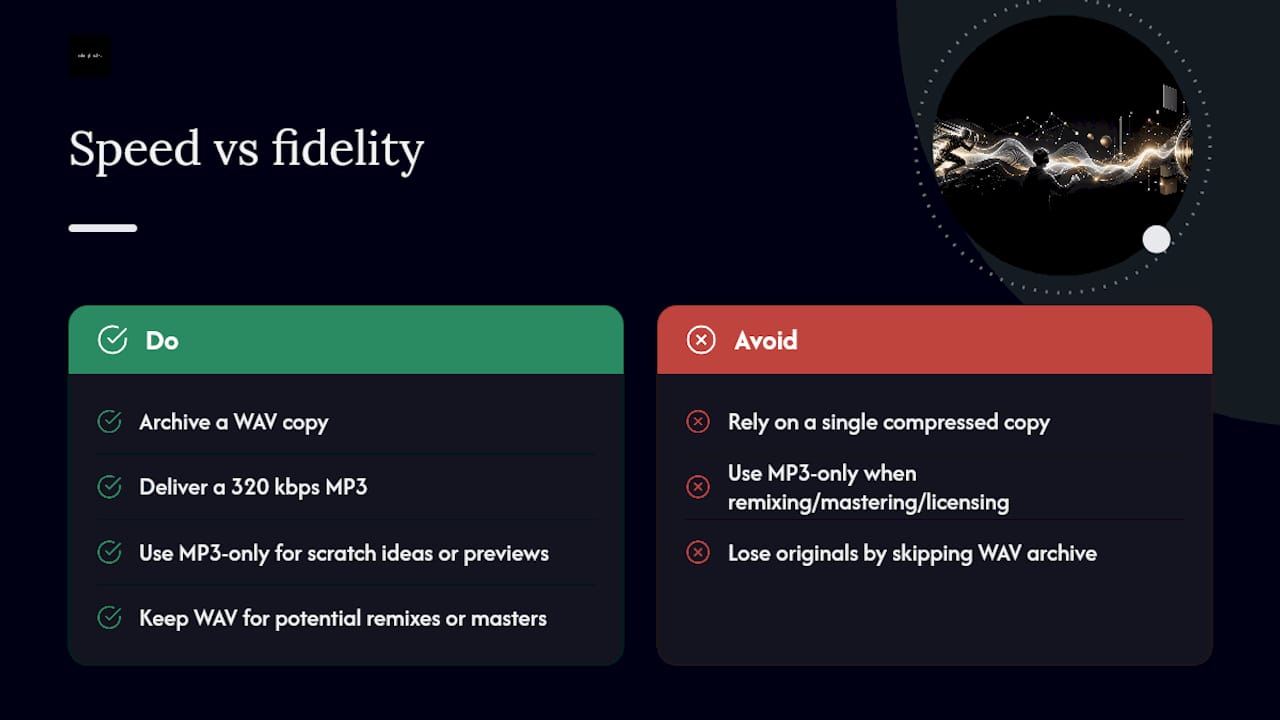
MP3 bitrate and fidelity comparison

The default worth building into your workflow is simple: archive a WAV, deliver a 320 kbps MP3. That single habit protects you from ever having to re-record something because the only surviving copy was already compressed.

Quick MP3-only exports are fine for scratch ideas, quick client previews, or anything disposable. Keep the WAV anywhere the beat might get remixed, mastered again, or licensed later.

— Thomas

Skip the Recording Chain: Tellingbeatzz Delivers Finished Beats

Every workflow above assumes you’re building the beat yourself, but sometimes the faster move is skipping recording and conversion entirely. Beats are available pre-delivered in MP3, WAV, and trackout formats, with licensing handled at checkout including commercial rights.
Tellingbeatzz

If you’re a songwriter who needs a beat ready for vocals tonight, or a producer assembling a release and short on time, buying a finished beat cuts out the export settings, the bitrate math, and the metadata cleanup covered above entirely. Custom beat packs allow access to multiple formats at once, avoiding the need to re-convert later if stems are required instead of a stereo mix. Browse the catalog of ready-to-download beats and pick a license that matches where the track is headed next.

Tools Worth Bookmarking

  • BandLab for free cloud recording and one-click MP3 export.
  • Audiotool for a full browser DAW with sample libraries built in.
  • AudioToolz for local, no-upload MP3 conversion powered by FFmpeg.
  • CloudConvert for flexible online conversion from nearly any format.
  • Audio Editor by Puter for direct-to-disk browser recording during long sessions.
  • Tembrica for browser-based vocal overdubs with latency compensation.

Sources

FAQ

How Do I Convert My Recording to MP3?

Export or bounce your recording as a WAV file first, then run it through a converter like CloudConvert, VLC, or FFmpeg set to 192 to 320 kbps. Converting from the lossless WAV rather than an already-compressed file preserves noticeably more detail.

How Can I Record Audio as MP3 Files Directly?

Most DAWs and browser studios like BandLab and Audiotool let you export directly to MP3 by choosing it in the export or render menu, though bouncing to WAV first and encoding separately gives you an archival copy too. Direct MP3 export is fine for quick, disposable takes.

How Do I Save a Recording as an MP3?

After recording, use your software’s export or “render to disk” function, select MP3 as the output format, and set the bitrate to at least 192 kbps before saving. Browser tools like Puter’s audio editor support this same export flow without installing anything.

Converting audio you own or have the rights to use is legal; the legal risk comes from what you do with someone else’s copyrighted recording, not the act of conversion itself. Always confirm you hold a valid license, like the ones Tellingbeatzz includes with every beat purchase, before distributing or monetizing converted audio.

What Bitrate Should I Use When Recording to MP3 Beat Files?

192 to 320 kbps covers nearly every use case, with 320 kbps CBR recommended for final masters and anything headed into DJ software that relies on stable seek points.

Tellingbeatzz

Music producer from Munich, Germany.

All Author Posts

No Comments

Leave a Reply

Stay Updated

Get new beat releases, exclusive offers and updates delivered directly to your inbox.

Choose A License

Mp3 Unlimited (+3 FREE)

MP3
License Terms

Unlimited License Agreement

This Unlimited License Agreement (the “Agreement”) is entered into on [Purchase Date] between Thomas Hodek, professionally known as Tellingbeatzz (“Licensor”) and [Customer Full Name] (“Licensee”).
The Licensee has purchased an MP3 Unlimited License for the instrumental titled “[Beat Title]” (“Beat”) for a license fee of [Purchase Price] under Order #[Order Number].
Upon successful payment, this Agreement becomes effective immediately and is delivered electronically together with the licensed Beat files.

1. Grant of License

The Licensor grants the Licensee a non-exclusive, worldwide, non-transferable and perpetual license to use the Beat to create and commercially exploit one or more new songs incorporating the Beat (“New Song”).
The Licensee may add vocals, lyrics, melodies, instrumentation, arrangements and other original contributions to the Beat.
The Beat itself remains the intellectual property of the Licensor and is not sold or transferred to the Licensee.

2. Unlimited Commercial Use

The Licensee may commercially release and use the New Song without limits on:
  • digital or physical distribution
  • sales
  • audio streams
  • monetized video streams
  • music videos
  • live or paid performances
  • radio and online broadcasts
  • social media content
  • albums, EPs, mixtapes and singles
There are no limits on streams, sales, downloads, views or performances generated by the New Song.

3. Master Recording and Revenue

The Licensee may create and commercially exploit a new master recording incorporating the Beat (“Master Recording”).
The Licensee retains the revenue generated directly from exploitation of the Master Recording, including streaming, digital distribution and physical sales, subject to any publishing, mechanical, performance or other composition-based royalties attributable to the Licensor’s share of the underlying composition.
The Licensor does not acquire ownership of the Licensee’s original lyrics, vocals or other independently created contributions.

4. Ownership

The Licensor retains all rights, title and interest in the original Beat, including the applicable copyright interests in the musical composition and sound recording.
This Agreement does not transfer ownership or copyright in the Beat to the Licensee.
The Licensee may protect or register their own original contributions to the New Song but may not claim sole ownership or authorship of the underlying Beat.

5. Publishing and Songwriting

For each New Song created under this Agreement, the underlying composition shall be divided as follows:
Licensee: 50%
Licensor: 50%
The Licensee agrees to properly identify the Licensor’s share when registering the New Song with a Performing Rights Organization, publisher, publishing administrator or other rights-management organization.
Licensor PRO Information:
Writer / Composer: Thomas Hodek
Producer Name: Tellingbeatzz
PRO: GEMA (Germany)
IPI / CAE: 716014087
Publishing Administrator: BeatStars Publishing Worldwide

6. Credit

Where credits are customarily provided, the Licensee agrees to credit the Producer as:
Produced by Tellingbeatzz
or
Beat by Tellingbeatzz
If additional featured-vocalist or hook credits are supplied with the Beat, those credits must also be included where reasonably applicable.

7. Content ID

Because the Beat may be licensed non-exclusively to multiple artists, the Licensee may not register the Beat or any New Song containing the Beat with YouTube Content ID or any similar automated copyright-claiming or fingerprinting system without prior written permission from the Licensor.
The Licensor reserves the right to register and administer the Beat through Content ID or similar systems.
If the Licensee receives a claim relating to a valid licensed use, proof of purchase may be submitted for review and release where appropriate.

8. Synchronization

The Licensee may synchronize the New Song with:
  • music videos
  • YouTube videos
  • social media content
  • podcasts
  • online promotional content
  • independent films and video projects
Major third-party commercial synchronization uses, including national advertising campaigns, television productions, feature films, major video games or comparable commercial projects, require prior written approval from the Licensor.

9. Prohibited Uses

The Licensee may not:
  1. resell, redistribute or sublicense the Beat in its original or substantially similar instrumental form;
  2. upload or distribute the Beat as a standalone instrumental under the Licensee’s name;
  3. include the Beat in beat packs, sample packs, loop libraries, sound libraries or production libraries;
  4. claim authorship or ownership of the original Beat;
  5. register the Beat or New Song with Content ID without permission;
  6. transfer this License to another person or entity without written consent;
  7. share the Beat files with third parties except persons directly involved in producing, recording, mixing, mastering or distributing the New Song.

10. Files Included

The files delivered depend on the license purchased:
MP3 Unlimited: MP3
WAV Unlimited: MP3 + WAV
Trackout Unlimited: MP3 + WAV + available tracked-out stems
The file format supplied does not change the commercial usage rights granted under this Agreement.

11. Non-Exclusive License

This is a non-exclusive license.
The Licensor may continue licensing or selling the same Beat to other customers.
The Licensee acknowledges that other artists may legally release different songs using the same Beat.

12. Future Exclusive Sale

If exclusive rights to the Beat are sold after this Agreement has taken effect, this License remains valid.
The Licensee may continue using, distributing and monetizing the New Song according to the terms of this Agreement.

13. Samples and Third-Party Material

Where the Beat contains third-party material requiring clearance, the Licensee is responsible for obtaining any additional clearance required for the Licensee’s intended use unless otherwise agreed in writing.
The Licensor will disclose known third-party clearance requirements where reasonably possible.

14. Term

This License is valid in perpetuity, provided the Licensee complies with this Agreement.
No renewal payment is required.

15. Breach

If the Licensee materially breaches this Agreement, the Licensor may provide written notice and, where the breach can reasonably be corrected, allow 30 days to cure the violation.
If the breach is not corrected within that period, the Licensor may terminate the License and pursue available remedies.

16. Governing Law

This Agreement is governed by the laws of the Federal Republic of Germany, without prejudice to mandatory consumer protection laws applicable to the Licensee.

17. Entire Agreement

This Agreement, together with the applicable WooCommerce order confirmation, constitutes the complete agreement between the Licensor and Licensee regarding the licensed Beat.
If any provision is found invalid or unenforceable, the remaining provisions remain effective.

WAV Unlimited (+6 FREE)

WAV, MP3
License Terms

Unlimited License Agreement

This Unlimited License Agreement (the “Agreement”) is entered into on [Purchase Date] between Thomas Hodek, professionally known as Tellingbeatzz (“Licensor”) and [Customer Full Name] (“Licensee”).
The Licensee has purchased an WAV Unlimited License for the instrumental titled “[Beat Title]” (“Beat”) for a license fee of [Purchase Price] under Order #[Order Number].
Upon successful payment, this Agreement becomes effective immediately and is delivered electronically together with the licensed Beat files.

1. Grant of License

The Licensor grants the Licensee a non-exclusive, worldwide, non-transferable and perpetual license to use the Beat to create and commercially exploit one or more new songs incorporating the Beat (“New Song”).
The Licensee may add vocals, lyrics, melodies, instrumentation, arrangements and other original contributions to the Beat.
The Beat itself remains the intellectual property of the Licensor and is not sold or transferred to the Licensee.

2. Unlimited Commercial Use

The Licensee may commercially release and use the New Song without limits on:
  • digital or physical distribution
  • sales
  • audio streams
  • monetized video streams
  • music videos
  • live or paid performances
  • radio and online broadcasts
  • social media content
  • albums, EPs, mixtapes and singles
There are no limits on streams, sales, downloads, views or performances generated by the New Song.

3. Master Recording and Revenue

The Licensee may create and commercially exploit a new master recording incorporating the Beat (“Master Recording”).
The Licensee retains the revenue generated directly from exploitation of the Master Recording, including streaming, digital distribution and physical sales, subject to any publishing, mechanical, performance or other composition-based royalties attributable to the Licensor’s share of the underlying composition.
The Licensor does not acquire ownership of the Licensee’s original lyrics, vocals or other independently created contributions.

4. Ownership

The Licensor retains all rights, title and interest in the original Beat, including the applicable copyright interests in the musical composition and sound recording.
This Agreement does not transfer ownership or copyright in the Beat to the Licensee.
The Licensee may protect or register their own original contributions to the New Song but may not claim sole ownership or authorship of the underlying Beat.

5. Publishing and Songwriting

For each New Song created under this Agreement, the underlying composition shall be divided as follows:
Licensee: 50%
Licensor: 50%
The Licensee agrees to properly identify the Licensor’s share when registering the New Song with a Performing Rights Organization, publisher, publishing administrator or other rights-management organization.
Licensor PRO Information:
Writer / Composer: Thomas Hodek
Producer Name: Tellingbeatzz
PRO: GEMA (Germany)
IPI / CAE: 716014087
Publishing Administrator: BeatStars Publishing Worldwide

6. Credit

Where credits are customarily provided, the Licensee agrees to credit the Producer as:
Produced by Tellingbeatzz
or
Beat by Tellingbeatzz
If additional featured-vocalist or hook credits are supplied with the Beat, those credits must also be included where reasonably applicable.

7. Content ID

Because the Beat may be licensed non-exclusively to multiple artists, the Licensee may not register the Beat or any New Song containing the Beat with YouTube Content ID or any similar automated copyright-claiming or fingerprinting system without prior written permission from the Licensor.
The Licensor reserves the right to register and administer the Beat through Content ID or similar systems.
If the Licensee receives a claim relating to a valid licensed use, proof of purchase may be submitted for review and release where appropriate.

8. Synchronization

The Licensee may synchronize the New Song with:
  • music videos
  • YouTube videos
  • social media content
  • podcasts
  • online promotional content
  • independent films and video projects
Major third-party commercial synchronization uses, including national advertising campaigns, television productions, feature films, major video games or comparable commercial projects, require prior written approval from the Licensor.

9. Prohibited Uses

The Licensee may not:
  1. resell, redistribute or sublicense the Beat in its original or substantially similar instrumental form;
  2. upload or distribute the Beat as a standalone instrumental under the Licensee’s name;
  3. include the Beat in beat packs, sample packs, loop libraries, sound libraries or production libraries;
  4. claim authorship or ownership of the original Beat;
  5. register the Beat or New Song with Content ID without permission;
  6. transfer this License to another person or entity without written consent;
  7. share the Beat files with third parties except persons directly involved in producing, recording, mixing, mastering or distributing the New Song.

10. Files Included

The files delivered depend on the license purchased:
MP3 Unlimited: MP3
WAV Unlimited: MP3 + WAV
Trackout Unlimited: MP3 + WAV + available tracked-out stems
The file format supplied does not change the commercial usage rights granted under this Agreement.

11. Non-Exclusive License

This is a non-exclusive license.
The Licensor may continue licensing or selling the same Beat to other customers.
The Licensee acknowledges that other artists may legally release different songs using the same Beat.

12. Future Exclusive Sale

If exclusive rights to the Beat are sold after this Agreement has taken effect, this License remains valid.
The Licensee may continue using, distributing and monetizing the New Song according to the terms of this Agreement.

13. Samples and Third-Party Material

Where the Beat contains third-party material requiring clearance, the Licensee is responsible for obtaining any additional clearance required for the Licensee’s intended use unless otherwise agreed in writing.
The Licensor will disclose known third-party clearance requirements where reasonably possible.

14. Term

This License is valid in perpetuity, provided the Licensee complies with this Agreement.
No renewal payment is required.

15. Breach

If the Licensee materially breaches this Agreement, the Licensor may provide written notice and, where the breach can reasonably be corrected, allow 30 days to cure the violation.
If the breach is not corrected within that period, the Licensor may terminate the License and pursue available remedies.

16. Governing Law

This Agreement is governed by the laws of the Federal Republic of Germany, without prejudice to mandatory consumer protection laws applicable to the Licensee.

17. Entire Agreement

This Agreement, together with the applicable WooCommerce order confirmation, constitutes the complete agreement between the Licensor and Licensee regarding the licensed Beat.
If any provision is found invalid or unenforceable, the remaining provisions remain effective.

Trackout Unlimited (+9 FREE)

WAV, MP3, Trackout
License Terms

Unlimited License Agreement

This Unlimited License Agreement (the “Agreement”) is entered into on [Purchase Date] between Thomas Hodek, professionally known as Tellingbeatzz (“Licensor”) and [Customer Full Name] (“Licensee”).
The Licensee has purchased an Trackout Unlimited License for the instrumental titled “[Beat Title]” (“Beat”) for a license fee of [Purchase Price] under Order #[Order Number].
Upon successful payment, this Agreement becomes effective immediately and is delivered electronically together with the licensed Beat files.

1. Grant of License

The Licensor grants the Licensee a non-exclusive, worldwide, non-transferable and perpetual license to use the Beat to create and commercially exploit one or more new songs incorporating the Beat (“New Song”).
The Licensee may add vocals, lyrics, melodies, instrumentation, arrangements and other original contributions to the Beat.
The Beat itself remains the intellectual property of the Licensor and is not sold or transferred to the Licensee.

2. Unlimited Commercial Use

The Licensee may commercially release and use the New Song without limits on:
  • digital or physical distribution
  • sales
  • audio streams
  • monetized video streams
  • music videos
  • live or paid performances
  • radio and online broadcasts
  • social media content
  • albums, EPs, mixtapes and singles
There are no limits on streams, sales, downloads, views or performances generated by the New Song.

3. Master Recording and Revenue

The Licensee may create and commercially exploit a new master recording incorporating the Beat (“Master Recording”).
The Licensee retains the revenue generated directly from exploitation of the Master Recording, including streaming, digital distribution and physical sales, subject to any publishing, mechanical, performance or other composition-based royalties attributable to the Licensor’s share of the underlying composition.
The Licensor does not acquire ownership of the Licensee’s original lyrics, vocals or other independently created contributions.

4. Ownership

The Licensor retains all rights, title and interest in the original Beat, including the applicable copyright interests in the musical composition and sound recording.
This Agreement does not transfer ownership or copyright in the Beat to the Licensee.
The Licensee may protect or register their own original contributions to the New Song but may not claim sole ownership or authorship of the underlying Beat.

5. Publishing and Songwriting

For each New Song created under this Agreement, the underlying composition shall be divided as follows:
Licensee: 50%
Licensor: 50%
The Licensee agrees to properly identify the Licensor’s share when registering the New Song with a Performing Rights Organization, publisher, publishing administrator or other rights-management organization.
Licensor PRO Information:
Writer / Composer: Thomas Hodek
Producer Name: Tellingbeatzz
PRO: GEMA (Germany)
IPI / CAE: 716014087
Publishing Administrator: BeatStars Publishing Worldwide

6. Credit

Where credits are customarily provided, the Licensee agrees to credit the Producer as:
Produced by Tellingbeatzz
or
Beat by Tellingbeatzz
If additional featured-vocalist or hook credits are supplied with the Beat, those credits must also be included where reasonably applicable.

7. Content ID

Because the Beat may be licensed non-exclusively to multiple artists, the Licensee may not register the Beat or any New Song containing the Beat with YouTube Content ID or any similar automated copyright-claiming or fingerprinting system without prior written permission from the Licensor.
The Licensor reserves the right to register and administer the Beat through Content ID or similar systems.
If the Licensee receives a claim relating to a valid licensed use, proof of purchase may be submitted for review and release where appropriate.

8. Synchronization

The Licensee may synchronize the New Song with:
  • music videos
  • YouTube videos
  • social media content
  • podcasts
  • online promotional content
  • independent films and video projects
Major third-party commercial synchronization uses, including national advertising campaigns, television productions, feature films, major video games or comparable commercial projects, require prior written approval from the Licensor.

9. Prohibited Uses

The Licensee may not:
  1. resell, redistribute or sublicense the Beat in its original or substantially similar instrumental form;
  2. upload or distribute the Beat as a standalone instrumental under the Licensee’s name;
  3. include the Beat in beat packs, sample packs, loop libraries, sound libraries or production libraries;
  4. claim authorship or ownership of the original Beat;
  5. register the Beat or New Song with Content ID without permission;
  6. transfer this License to another person or entity without written consent;
  7. share the Beat files with third parties except persons directly involved in producing, recording, mixing, mastering or distributing the New Song.

10. Files Included

The files delivered depend on the license purchased:
MP3 Unlimited: MP3
WAV Unlimited: MP3 + WAV
Trackout Unlimited: MP3 + WAV + available tracked-out stems
The file format supplied does not change the commercial usage rights granted under this Agreement.

11. Non-Exclusive License

This is a non-exclusive license.
The Licensor may continue licensing or selling the same Beat to other customers.
The Licensee acknowledges that other artists may legally release different songs using the same Beat.

12. Future Exclusive Sale

If exclusive rights to the Beat are sold after this Agreement has taken effect, this License remains valid.
The Licensee may continue using, distributing and monetizing the New Song according to the terms of this Agreement.

13. Samples and Third-Party Material

Where the Beat contains third-party material requiring clearance, the Licensee is responsible for obtaining any additional clearance required for the Licensee’s intended use unless otherwise agreed in writing.
The Licensor will disclose known third-party clearance requirements where reasonably possible.

14. Term

This License is valid in perpetuity, provided the Licensee complies with this Agreement.
No renewal payment is required.

15. Breach

If the Licensee materially breaches this Agreement, the Licensor may provide written notice and, where the breach can reasonably be corrected, allow 30 days to cure the violation.
If the breach is not corrected within that period, the Licensor may terminate the License and pursue available remedies.

16. Governing Law

This Agreement is governed by the laws of the Federal Republic of Germany, without prejudice to mandatory consumer protection laws applicable to the Licensee.

17. Entire Agreement

This Agreement, together with the applicable WooCommerce order confirmation, constitutes the complete agreement between the Licensor and Licensee regarding the licensed Beat.
If any provision is found invalid or unenforceable, the remaining provisions remain effective.

Download

To download your free version of please enter your name and email address and the download link will be emailed to you

Your download link has been emailed to you