

Build a Beat Pack & Save More Build Your Pack
Preserve Dynamics: Loudness for Streaming Releases for Producers
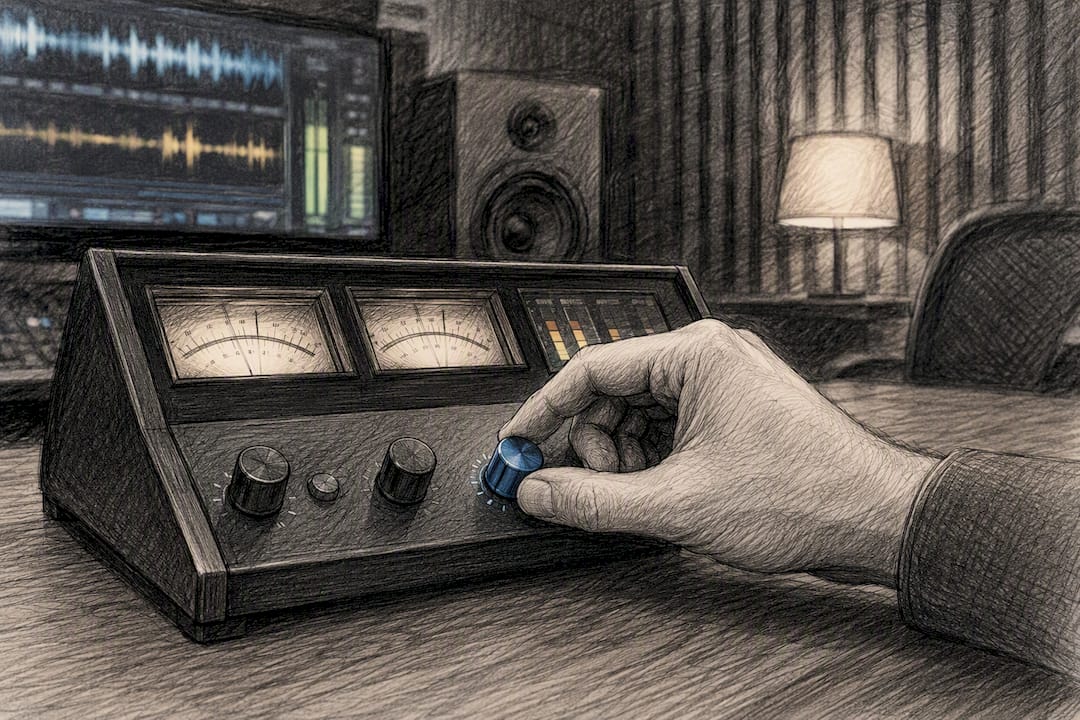
Engineer adjusting audio mastering loudness meters

Preserve Dynamics: Loudness for Streaming Releases for Producers

For most streaming releases, aim for a master that reads near the common platform cluster target of integrated LUFS and with true peaks held at or below a safe digital ceiling to avoid distortion. Streaming platforms apply loudness normalization at playback rather than altering your file, and most support an album-mode setting that preserves the dynamic relationship between tracks when you use it correctly.


TL;DR:

  • Master your track to approximately −14 LUFS integrated and keep the true peak at or below −1 dBTP to ensure compatibility with major streaming platforms.
  • Streaming normalization applies gain adjustments at playback, so louder masters are turned down, making over-compression and excessive loudness counterproductive.
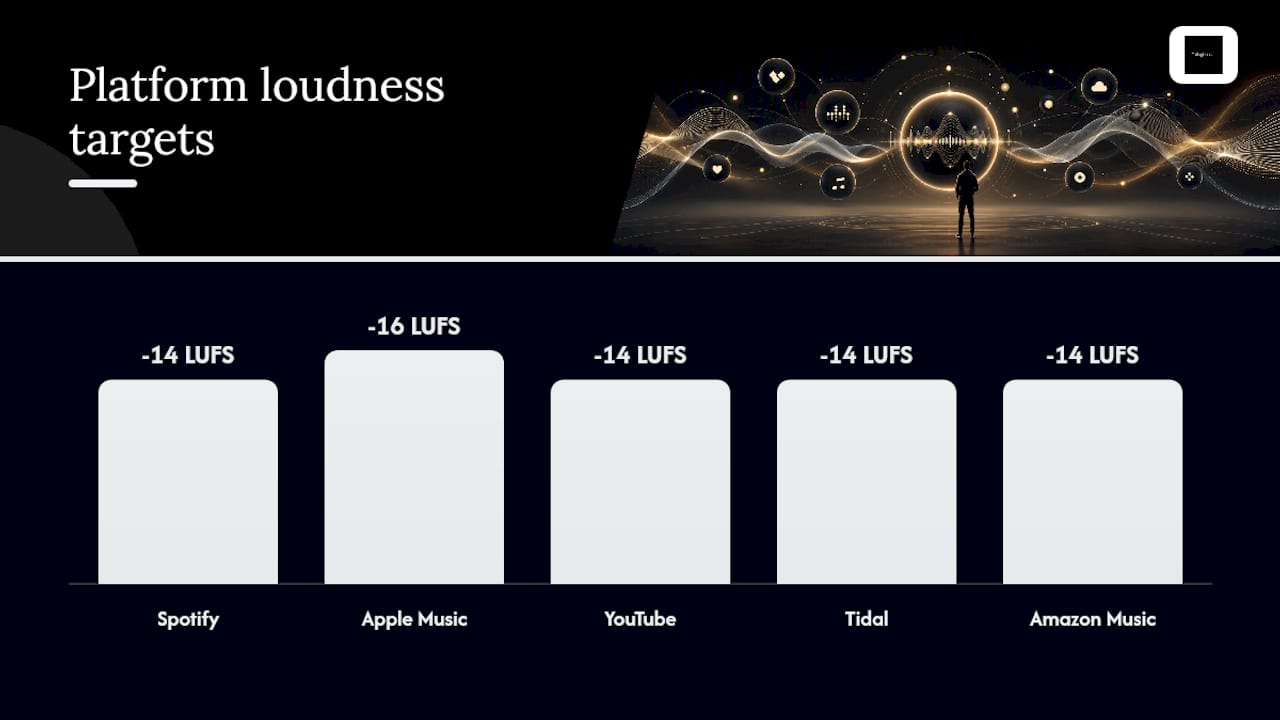
  • Different platforms target similar loudness levels, with Spotify, YouTube, Tidal, and Amazon averaging around −14 LUFS, while Apple Music leans closer to −16 LUFS.
  • Preserving dynamic range and avoiding inter-sample clipping are key, especially for genres like hip-hop or acoustic music, where loudness and LRA reflect musical intention.
  • Use consistent mastering for albums in album mode to maintain the intended dynamics and relationships between tracks, avoiding normalization-induced flattening.

Tellingbeatzz
Find the Right Beat for Your Release
Explore rap beats and hip hop instrumentals designed to give independent artists and songwriters a strong creative foundation.

Table of Contents

What Loudness and LUFS Mean for Your Master

Loudness is not the same thing as peak level, and confusing the two is where most self-mastered records go wrong. Peak level measures the tallest spike in a waveform. Loudness measures how the human ear perceives sustained energy across a piece of music, and that perception is what LUFS was built to quantify.

LUFS stands for Loudness Units Full Scale, and it comes from the ITU-R BS.1770 measurement standard, which weights frequencies the way the ear actually hears them rather than treating every frequency band equally. A kick drum transient and a sustained vocal note can share the same peak level but produce wildly different loudness readings, because BS.1770 applies K-weighting that emphasizes the midrange where our hearing is most sensitive.

Three numbers matter when you’re evaluating a master:

  • Integrated LUFS measures the average perceived loudness across the entire track or album, from start to finish.
  • Loudness Range (LRA) measures the spread between quiet and loud passages, expressed in loudness units. A high LRA means a track breathes; a near-zero LRA usually signals heavy limiting.
  • True peak (dBTP) measures the highest instantaneous level a digital-to-analog converter would actually reproduce, including inter-sample peaks a standard peak meter can miss entirely.

Crest factor, the gap between peak and average level, is the older cousin of LRA and tells a similar story: how much punch survives above the loudness floor. When you’re mastering, integrated LUFS tells you where the track sits relative to a platform’s target. LRA tells you whether the arrangement still has room to breathe. A trap beat with a tight, compressed low end might read −13 LUFS integrated with an LRA of 4, while a soul-influenced record with dynamic verses and choruses might land at −14 LUFS with an LRA of 8. Neither number is wrong. They describe different musical intentions, and reading them correctly is the first skill every mastering engineer needs before touching a limiter.

How Streaming Normalization Actually Works

Streaming normalization for platforms like Spotify, Apple Music, YouTube, Tidal, and Amazon does not rewrite your master file. It applies a gain offset at the moment of playback, adjusting perceived volume up or down to match a target loudness while your original bits sit untouched on the server. This distinction matters more than most producers realize, because it means loud masters get turned down, not rejected, and quiet masters only get turned up within strict limits.

Spotify documents this behavior directly: its default listening mode, Normal, targets roughly −14 LUFS, and the platform offers Quiet, Normal, and Loud presets that listeners can choose themselves. The Loud preset applies additional limiting on Spotify’s end to push perceived volume higher, which means your carefully calibrated dynamics can still get squeezed if a listener has that setting enabled. You can’t control that variable, but it’s worth knowing it exists before you assume your master is the only thing shaping the final playback experience.

Here’s how the major platforms compare in practice:

  1. Spotify targets around −14 LUFS integrated and offers user-selectable Quiet, Normal, and Loud presets, per Spotify’s own documentation.
  2. Apple Music runs its Sound Check feature closer to −16 LUFS, aligning with AES-recommended distribution loudness for a slightly more conservative target than Spotify.
  3. YouTube normalizes toward roughly −14 LUFS, similar to Spotify’s Normal preset, according to comparative platform data.
  4. Tidal clusters near −14 LUFS as well, keeping it in line with the Spotify and YouTube cluster rather than Apple’s more restrained approach.
  5. Amazon Music also sits close to that −14 LUFS neighborhood, rounding out a pack of four major services that behave almost identically at the playback stage.

The practical consequence is this: mastering louder than a platform’s typical target level accomplishes little because the platform reduces loud tracks to its normalization target, so over-compression is counterproductive. Meanwhile, mastering too quiet creates a different problem. Spotify’s boost on quiet masters is constrained by true-peak headroom: if bringing a quiet master up to target would push true peaks past the ceiling, the platform simply won’t boost it that far, and your track plays back softer than intended relative to everything around it in a listener’s queue.

One more wrinkle worth flagging for anyone selling direct downloads alongside streaming releases: Bandcamp and similar direct-download platforms often apply no normalization at all. Whatever master you upload there is exactly what the buyer hears, unchanged. That’s a meaningful consideration if you’re selling a paid download alongside a Spotify release, since the two listening contexts won’t behave the same way.
How Streaming Normalization Actually Works — overview diagram

Practical LUFS Targets and File-Delivery Specs

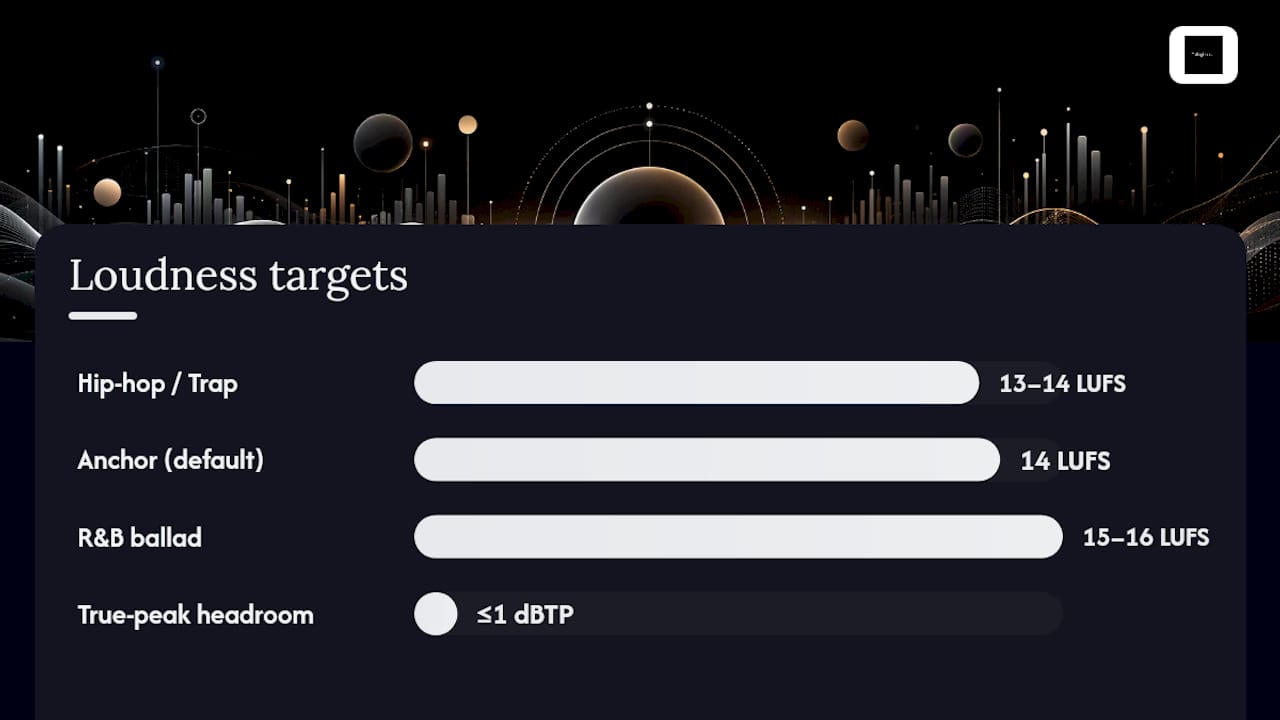
A single target works for the overwhelming majority of releases: master to roughly −14 LUFS integrated and hold true peak at or below −1 dBTP. That range aligns with where Spotify, YouTube, Tidal, and Amazon cluster, while giving you enough headroom that Apple Music’s more conservative −16 LUFS target won’t punish you either, since Apple simply turns your track down a couple of extra units rather than boosting it.

Genre shifts this slightly. Hip-hop and rap mixes with dense low-end content often read louder at a given perceived volume than sparse acoustic material, because sub-bass energy contributes heavily to integrated LUFS measurements without necessarily sounding “loud” to a casual listener. A well-mixed trap beat might comfortably sit at −13 to −14 LUFS with plenty of transient punch intact, while a stripped-down R&B ballad might need to sit closer to −15 or −16 LUFS to preserve its dynamic breath. Treat −14 LUFS as your anchor point, not a wall you’re forbidden to cross in either direction.
LUFS ranges for hip-hop and RB masters

The −1 dBTP ceiling isn’t a suggestion born of caution. True-peak limiting exists because lossy codecs used by streaming services can raise apparent peak level through inter-sample reconstruction, meaning a file that peaks at exactly 0 dBFS on your DAW’s meter can clip audibly after encoding to AAC or Ogg Vorbis. A −1 dBTP ceiling gives the codec enough room to reconstruct those inter-sample peaks without distortion. Skip this step and you risk introducing harsh, crackly artifacts that only appear after your track hits the platform, invisible on your own studio monitors until it’s too late to fix cheaply.

File delivery matters just as much as the numbers you’re chasing:

  • Deliver 24-bit WAV files at your mix’s native standard sample rate, such as 44.1kHz or 48kHz; avoid unnecessary upsampling as it does not improve sound and increases file size.
  • Avoid delivering 32-bit float unless a specific platform or distributor requests it; most streaming aggregators expect standard 16 or 24-bit PCM WAV.
  • Double-check your limiter’s true-peak detection mode is actually engaged, not just a standard peak meter mislabeled as one, since many stock limiters default to sample-peak detection that misses inter-sample overshoots entirely.
  • Never bounce a final master through a lossy format and back to WAV for “testing” purposes. That round trip introduces the exact codec artifacts you’re trying to avoid before you’ve even uploaded anything.

Pro Tip: Run your finished master through an actual AAC or Ogg encode preview before you submit it anywhere. Most true-peak overshoots that cause audible codec distortion are invisible until you listen to the encoded version, not the WAV.

Album Mode and Preserving Your Release’s Dynamics

Album-mode normalization calculates one gain offset for the entire project rather than adjusting each track individually. AES TD1008 recommends this approach specifically because it preserves inter-track relationships: a quiet interlude stays quieter than the single that follows it, exactly as the artist intended, instead of both tracks getting normalized to identical loudness and flattening the emotional arc of the sequence.

Most major streaming platforms support album-mode playback when a release is uploaded and tagged correctly as a cohesive album rather than a loose collection of singles. The mechanism only works, though, if every track in the sequence was mastered with a consistent approach in mind.

Here’s how to protect that intention during mastering:

  • Master every track on the album against the same reference loudness rather than chasing an individual LUFS target per song.
  • Identify your loudest track first and use it as the ceiling; build the rest of the album’s dynamic relationships around that reference point rather than maximizing each track in isolation.
  • Keep true peak consistent at −1 dBTP across every track, since a single overshoot on one song can force unwanted platform-side limiting that disrupts the sequence’s flow.
  • After upload, stream the album straight through on at least two platforms to confirm the intended quiet-to-loud relationships survived the normalization process rather than getting collapsed.

Skipping this check is common, and it’s usually where an otherwise well-mastered album loses its shape on release day. A skit or interlude that was meant to feel like a breath between two singles can end up sounding like a mixing mistake if album-mode wasn’t engaged properly at the distributor level.

Your Final Mastering Checklist Before Delivery

Run through this sequence before any file leaves your session, in this order:

  1. Check integrated LUFS across the full track, not a fifteen-second loop, since a short loop measurement can mislead you about the true average across verses, choruses, and bridges.
  2. Check LRA to confirm you haven’t over-compressed the track into a flat, fatigued-sounding master that reads loud but feels lifeless next to a reference track.
  3. Check true peak using a dedicated true-peak meter, not your DAW’s default peak meter, and confirm every peak sits at or below −1 dBTP.
  4. Check crest factor informally by ear: does the track still have transient punch on drums and vocal consonants, or does everything sound glued together at one volume?
  5. Export and re-import the finished file to confirm no clipping or dithering artifacts were introduced during the bounce itself.
  6. Encode a preview in AAC or Ogg Vorbis and listen for any new distortion that wasn’t audible in the WAV.
  7. Listen on at least three playback systems, ideally studio monitors, a phone speaker, and consumer earbuds, since each reveals different problems a single reference point will miss.

Widely used measurement tools include Youlean Loudness Meter, iZotope Insight, and the metering built into mastering limiters like iZotope Ozone or FabFilter Pro L2, all of which display integrated LUFS, LRA, and true peak simultaneously so you’re not juggling separate plugins mid-session.

Pro Tip: If your limiter’s true-peak reading and a separate metering plugin disagree by more than 0.3 dB, trust the dedicated meter over the limiter’s built-in display. Limiters are optimized for gain reduction decisions, not measurement precision.

Interpreting these numbers takes context. A −14 LUFS integrated reading with an LRA under 3 usually means the track is over-limited regardless of genre. A −14 LUFS reading with an LRA of 6 to 9 on a hip-hop record typically indicates a master that still has transient life in the drums. There’s no universal LRA target, but a number that’s dropped to near zero is a warning sign worth investigating before you export final files.

Why “Louder Is Better” Is Bad Mastering Advice

The instinct to master as loud as possible predates streaming normalization, and it’s still the single most common mistake independent producers make. Pushing a master to −8 LUFS accomplishes nothing on a platform that turns everything down to roughly −14 LUFS anyway. All you’ve done is sacrifice transient punch and dynamic range for a perceived loudness advantage that gets erased the moment the track hits Spotify’s servers.

The reverse mistake is just as costly. Platform asymmetries mean quiet, dynamic masters don’t always get boosted to match louder competitors, particularly when true-peak headroom limits how much gain a platform can safely apply. A track mastered at −20 LUFS with generous headroom might get lifted close to target on Spotify, but that same track could sound noticeably softer than a −14 LUFS master when queued back-to-back in a playlist, since not every service applies upward gain as aggressively.

A few habits to retire immediately:

  • Stop chasing a specific LUFS number as a competitive metric against other artists’ releases; match your target to the platform average, not to whoever sounds loudest in your group chat.
  • Stop assuming a limiter with more gain reduction automatically sounds better; A/B test at matched loudness before deciding a heavier master actually improved the track.
  • Stop skipping true-peak checks because “it sounded fine in the DAW”; codec-induced clipping is inaudible until after encoding.
  • Stop uploading the same master everywhere without checking Bandcamp’s lack of normalization against your streaming version, particularly if you’re selling direct downloads at a premium price point.

Separate masters are rarely necessary for a typical independent release. The one real exception is broadcast or sync licensing work, where television and film delivery specs often call for a distinct loudness target around −23 to −24 LUFS to meet broadcast standards, a different world from consumer streaming entirely.

Mastering Hip-Hop Beats for Streaming Without Losing Punch

Preserving punch in a hip-hop or trap beat while hitting a −14 LUFS target comes down to sequencing your gain staging correctly before the limiter ever touches the signal. Heavy 808s and kick transients eat headroom fast, so parallel compression on the low end, applied before the master bus limiter, usually preserves more percussive snap than relying on a single limiter to do all the work at the end of the chain. Multiband compression on the low-mid buildup, rather than a single wideband limiter, keeps the top end from smearing when the low end pushes loudness up.

Buyers licensing instrumentals typically expect a specific delivery package: an MP3 for quick reference, a full-quality WAV for final production, and trackout stems for artists who want to remix elements or hand the beat to a mixing engineer later. Some buyers also request FLAC for lossless delivery without the larger WAV file size, which is worth having on hand as an option.

Every beat pack and custom trackout follows this same delivery logic, mastered with enough headroom that the artist licensing it can push their own vocal mix without fighting an already-limited instrumental.

Why Dynamics-Forward Mastering Wins in the Long Run

The technical case for streaming loudness comes down to one sentence: master for translation, not for volume, and let normalization do the leveling. But there’s an artistic case too, one that gets lost in LUFS spreadsheets. Music that breathes carries emotional weight that squeezed, brickwalled masters simply can’t hold onto, no matter how “competitive” the loudness reads on paper. A record that still has dynamic range six months after release tends to age better than one that chased a loudness war nobody’s actually fighting anymore. Preserving that range isn’t a technical courtesy. It’s a creative decision that respects the listener enough to let the music move.

— Thomas

Sources

Verify specs directly against Spotify’s loudness documentation, AES TD1008, and the EBU R128 streaming supplement for authoritative platform and standards guidance.

FAQ

What LUFS should my master be for streaming?

Aim for roughly −14 LUFS integrated for most releases, since that aligns with where Spotify, YouTube, Tidal, and Amazon cluster their normalization targets, while Apple Music sits slightly lower around −16 LUFS.

Should I leave loudness normalization on or off when checking my mix?

Keep normalization on when reference-listening on consumer platforms, since that’s how listeners will actually hear the track, but monitor your raw master without normalization during mixing and mastering to judge true dynamics and transient detail.

Broadcast and sync delivery typically requires a separate master around −23 to −24 LUFS to meet broadcast loudness standards, which is a distinct target from consumer streaming and should never be confused with your −14 LUFS streaming master.

What LUFS does Spotify target?

Spotify’s default Normal playback mode targets approximately −14 LUFS, with Quiet and Loud presets available for listeners who prefer a different perceived volume.

Is it worth mastering my track louder than −14 LUFS to stand out?

No. Streaming platforms apply a gain offset that turns loud masters down to their target loudness, so pushing past −14 LUFS integrated sacrifices dynamic range without gaining any real perceived volume advantage on playback.

Tellingbeatzz

Music producer from Munich, Germany.

All Author Posts

No Comments

Leave a Reply

Stay Updated

Get new beat releases, exclusive offers and updates delivered directly to your inbox.

Choose A License

Mp3 Unlimited (+3 FREE)

MP3
License Terms

Unlimited License Agreement

This Unlimited License Agreement (the “Agreement”) is entered into on [Purchase Date] between Thomas Hodek, professionally known as Tellingbeatzz (“Licensor”) and [Customer Full Name] (“Licensee”).
The Licensee has purchased an MP3 Unlimited License for the instrumental titled “[Beat Title]” (“Beat”) for a license fee of [Purchase Price] under Order #[Order Number].
Upon successful payment, this Agreement becomes effective immediately and is delivered electronically together with the licensed Beat files.

1. Grant of License

The Licensor grants the Licensee a non-exclusive, worldwide, non-transferable and perpetual license to use the Beat to create and commercially exploit one or more new songs incorporating the Beat (“New Song”).
The Licensee may add vocals, lyrics, melodies, instrumentation, arrangements and other original contributions to the Beat.
The Beat itself remains the intellectual property of the Licensor and is not sold or transferred to the Licensee.

2. Unlimited Commercial Use

The Licensee may commercially release and use the New Song without limits on:
  • digital or physical distribution
  • sales
  • audio streams
  • monetized video streams
  • music videos
  • live or paid performances
  • radio and online broadcasts
  • social media content
  • albums, EPs, mixtapes and singles
There are no limits on streams, sales, downloads, views or performances generated by the New Song.

3. Master Recording and Revenue

The Licensee may create and commercially exploit a new master recording incorporating the Beat (“Master Recording”).
The Licensee retains the revenue generated directly from exploitation of the Master Recording, including streaming, digital distribution and physical sales, subject to any publishing, mechanical, performance or other composition-based royalties attributable to the Licensor’s share of the underlying composition.
The Licensor does not acquire ownership of the Licensee’s original lyrics, vocals or other independently created contributions.

4. Ownership

The Licensor retains all rights, title and interest in the original Beat, including the applicable copyright interests in the musical composition and sound recording.
This Agreement does not transfer ownership or copyright in the Beat to the Licensee.
The Licensee may protect or register their own original contributions to the New Song but may not claim sole ownership or authorship of the underlying Beat.

5. Publishing and Songwriting

For each New Song created under this Agreement, the underlying composition shall be divided as follows:
Licensee: 50%
Licensor: 50%
The Licensee agrees to properly identify the Licensor’s share when registering the New Song with a Performing Rights Organization, publisher, publishing administrator or other rights-management organization.
Licensor PRO Information:
Writer / Composer: Thomas Hodek
Producer Name: Tellingbeatzz
PRO: GEMA (Germany)
IPI / CAE: 716014087
Publishing Administrator: BeatStars Publishing Worldwide

6. Credit

Where credits are customarily provided, the Licensee agrees to credit the Producer as:
Produced by Tellingbeatzz
or
Beat by Tellingbeatzz
If additional featured-vocalist or hook credits are supplied with the Beat, those credits must also be included where reasonably applicable.

7. Content ID

Because the Beat may be licensed non-exclusively to multiple artists, the Licensee may not register the Beat or any New Song containing the Beat with YouTube Content ID or any similar automated copyright-claiming or fingerprinting system without prior written permission from the Licensor.
The Licensor reserves the right to register and administer the Beat through Content ID or similar systems.
If the Licensee receives a claim relating to a valid licensed use, proof of purchase may be submitted for review and release where appropriate.

8. Synchronization

The Licensee may synchronize the New Song with:
  • music videos
  • YouTube videos
  • social media content
  • podcasts
  • online promotional content
  • independent films and video projects
Major third-party commercial synchronization uses, including national advertising campaigns, television productions, feature films, major video games or comparable commercial projects, require prior written approval from the Licensor.

9. Prohibited Uses

The Licensee may not:
  1. resell, redistribute or sublicense the Beat in its original or substantially similar instrumental form;
  2. upload or distribute the Beat as a standalone instrumental under the Licensee’s name;
  3. include the Beat in beat packs, sample packs, loop libraries, sound libraries or production libraries;
  4. claim authorship or ownership of the original Beat;
  5. register the Beat or New Song with Content ID without permission;
  6. transfer this License to another person or entity without written consent;
  7. share the Beat files with third parties except persons directly involved in producing, recording, mixing, mastering or distributing the New Song.

10. Files Included

The files delivered depend on the license purchased:
MP3 Unlimited: MP3
WAV Unlimited: MP3 + WAV
Trackout Unlimited: MP3 + WAV + available tracked-out stems
The file format supplied does not change the commercial usage rights granted under this Agreement.

11. Non-Exclusive License

This is a non-exclusive license.
The Licensor may continue licensing or selling the same Beat to other customers.
The Licensee acknowledges that other artists may legally release different songs using the same Beat.

12. Future Exclusive Sale

If exclusive rights to the Beat are sold after this Agreement has taken effect, this License remains valid.
The Licensee may continue using, distributing and monetizing the New Song according to the terms of this Agreement.

13. Samples and Third-Party Material

Where the Beat contains third-party material requiring clearance, the Licensee is responsible for obtaining any additional clearance required for the Licensee’s intended use unless otherwise agreed in writing.
The Licensor will disclose known third-party clearance requirements where reasonably possible.

14. Term

This License is valid in perpetuity, provided the Licensee complies with this Agreement.
No renewal payment is required.

15. Breach

If the Licensee materially breaches this Agreement, the Licensor may provide written notice and, where the breach can reasonably be corrected, allow 30 days to cure the violation.
If the breach is not corrected within that period, the Licensor may terminate the License and pursue available remedies.

16. Governing Law

This Agreement is governed by the laws of the Federal Republic of Germany, without prejudice to mandatory consumer protection laws applicable to the Licensee.

17. Entire Agreement

This Agreement, together with the applicable WooCommerce order confirmation, constitutes the complete agreement between the Licensor and Licensee regarding the licensed Beat.
If any provision is found invalid or unenforceable, the remaining provisions remain effective.

WAV Unlimited (+6 FREE)

WAV, MP3
License Terms

Unlimited License Agreement

This Unlimited License Agreement (the “Agreement”) is entered into on [Purchase Date] between Thomas Hodek, professionally known as Tellingbeatzz (“Licensor”) and [Customer Full Name] (“Licensee”).
The Licensee has purchased an WAV Unlimited License for the instrumental titled “[Beat Title]” (“Beat”) for a license fee of [Purchase Price] under Order #[Order Number].
Upon successful payment, this Agreement becomes effective immediately and is delivered electronically together with the licensed Beat files.

1. Grant of License

The Licensor grants the Licensee a non-exclusive, worldwide, non-transferable and perpetual license to use the Beat to create and commercially exploit one or more new songs incorporating the Beat (“New Song”).
The Licensee may add vocals, lyrics, melodies, instrumentation, arrangements and other original contributions to the Beat.
The Beat itself remains the intellectual property of the Licensor and is not sold or transferred to the Licensee.

2. Unlimited Commercial Use

The Licensee may commercially release and use the New Song without limits on:
  • digital or physical distribution
  • sales
  • audio streams
  • monetized video streams
  • music videos
  • live or paid performances
  • radio and online broadcasts
  • social media content
  • albums, EPs, mixtapes and singles
There are no limits on streams, sales, downloads, views or performances generated by the New Song.

3. Master Recording and Revenue

The Licensee may create and commercially exploit a new master recording incorporating the Beat (“Master Recording”).
The Licensee retains the revenue generated directly from exploitation of the Master Recording, including streaming, digital distribution and physical sales, subject to any publishing, mechanical, performance or other composition-based royalties attributable to the Licensor’s share of the underlying composition.
The Licensor does not acquire ownership of the Licensee’s original lyrics, vocals or other independently created contributions.

4. Ownership

The Licensor retains all rights, title and interest in the original Beat, including the applicable copyright interests in the musical composition and sound recording.
This Agreement does not transfer ownership or copyright in the Beat to the Licensee.
The Licensee may protect or register their own original contributions to the New Song but may not claim sole ownership or authorship of the underlying Beat.

5. Publishing and Songwriting

For each New Song created under this Agreement, the underlying composition shall be divided as follows:
Licensee: 50%
Licensor: 50%
The Licensee agrees to properly identify the Licensor’s share when registering the New Song with a Performing Rights Organization, publisher, publishing administrator or other rights-management organization.
Licensor PRO Information:
Writer / Composer: Thomas Hodek
Producer Name: Tellingbeatzz
PRO: GEMA (Germany)
IPI / CAE: 716014087
Publishing Administrator: BeatStars Publishing Worldwide

6. Credit

Where credits are customarily provided, the Licensee agrees to credit the Producer as:
Produced by Tellingbeatzz
or
Beat by Tellingbeatzz
If additional featured-vocalist or hook credits are supplied with the Beat, those credits must also be included where reasonably applicable.

7. Content ID

Because the Beat may be licensed non-exclusively to multiple artists, the Licensee may not register the Beat or any New Song containing the Beat with YouTube Content ID or any similar automated copyright-claiming or fingerprinting system without prior written permission from the Licensor.
The Licensor reserves the right to register and administer the Beat through Content ID or similar systems.
If the Licensee receives a claim relating to a valid licensed use, proof of purchase may be submitted for review and release where appropriate.

8. Synchronization

The Licensee may synchronize the New Song with:
  • music videos
  • YouTube videos
  • social media content
  • podcasts
  • online promotional content
  • independent films and video projects
Major third-party commercial synchronization uses, including national advertising campaigns, television productions, feature films, major video games or comparable commercial projects, require prior written approval from the Licensor.

9. Prohibited Uses

The Licensee may not:
  1. resell, redistribute or sublicense the Beat in its original or substantially similar instrumental form;
  2. upload or distribute the Beat as a standalone instrumental under the Licensee’s name;
  3. include the Beat in beat packs, sample packs, loop libraries, sound libraries or production libraries;
  4. claim authorship or ownership of the original Beat;
  5. register the Beat or New Song with Content ID without permission;
  6. transfer this License to another person or entity without written consent;
  7. share the Beat files with third parties except persons directly involved in producing, recording, mixing, mastering or distributing the New Song.

10. Files Included

The files delivered depend on the license purchased:
MP3 Unlimited: MP3
WAV Unlimited: MP3 + WAV
Trackout Unlimited: MP3 + WAV + available tracked-out stems
The file format supplied does not change the commercial usage rights granted under this Agreement.

11. Non-Exclusive License

This is a non-exclusive license.
The Licensor may continue licensing or selling the same Beat to other customers.
The Licensee acknowledges that other artists may legally release different songs using the same Beat.

12. Future Exclusive Sale

If exclusive rights to the Beat are sold after this Agreement has taken effect, this License remains valid.
The Licensee may continue using, distributing and monetizing the New Song according to the terms of this Agreement.

13. Samples and Third-Party Material

Where the Beat contains third-party material requiring clearance, the Licensee is responsible for obtaining any additional clearance required for the Licensee’s intended use unless otherwise agreed in writing.
The Licensor will disclose known third-party clearance requirements where reasonably possible.

14. Term

This License is valid in perpetuity, provided the Licensee complies with this Agreement.
No renewal payment is required.

15. Breach

If the Licensee materially breaches this Agreement, the Licensor may provide written notice and, where the breach can reasonably be corrected, allow 30 days to cure the violation.
If the breach is not corrected within that period, the Licensor may terminate the License and pursue available remedies.

16. Governing Law

This Agreement is governed by the laws of the Federal Republic of Germany, without prejudice to mandatory consumer protection laws applicable to the Licensee.

17. Entire Agreement

This Agreement, together with the applicable WooCommerce order confirmation, constitutes the complete agreement between the Licensor and Licensee regarding the licensed Beat.
If any provision is found invalid or unenforceable, the remaining provisions remain effective.

Trackout Unlimited (+9 FREE)

WAV, MP3, Trackout
License Terms

Unlimited License Agreement

This Unlimited License Agreement (the “Agreement”) is entered into on [Purchase Date] between Thomas Hodek, professionally known as Tellingbeatzz (“Licensor”) and [Customer Full Name] (“Licensee”).
The Licensee has purchased an Trackout Unlimited License for the instrumental titled “[Beat Title]” (“Beat”) for a license fee of [Purchase Price] under Order #[Order Number].
Upon successful payment, this Agreement becomes effective immediately and is delivered electronically together with the licensed Beat files.

1. Grant of License

The Licensor grants the Licensee a non-exclusive, worldwide, non-transferable and perpetual license to use the Beat to create and commercially exploit one or more new songs incorporating the Beat (“New Song”).
The Licensee may add vocals, lyrics, melodies, instrumentation, arrangements and other original contributions to the Beat.
The Beat itself remains the intellectual property of the Licensor and is not sold or transferred to the Licensee.

2. Unlimited Commercial Use

The Licensee may commercially release and use the New Song without limits on:
  • digital or physical distribution
  • sales
  • audio streams
  • monetized video streams
  • music videos
  • live or paid performances
  • radio and online broadcasts
  • social media content
  • albums, EPs, mixtapes and singles
There are no limits on streams, sales, downloads, views or performances generated by the New Song.

3. Master Recording and Revenue

The Licensee may create and commercially exploit a new master recording incorporating the Beat (“Master Recording”).
The Licensee retains the revenue generated directly from exploitation of the Master Recording, including streaming, digital distribution and physical sales, subject to any publishing, mechanical, performance or other composition-based royalties attributable to the Licensor’s share of the underlying composition.
The Licensor does not acquire ownership of the Licensee’s original lyrics, vocals or other independently created contributions.

4. Ownership

The Licensor retains all rights, title and interest in the original Beat, including the applicable copyright interests in the musical composition and sound recording.
This Agreement does not transfer ownership or copyright in the Beat to the Licensee.
The Licensee may protect or register their own original contributions to the New Song but may not claim sole ownership or authorship of the underlying Beat.

5. Publishing and Songwriting

For each New Song created under this Agreement, the underlying composition shall be divided as follows:
Licensee: 50%
Licensor: 50%
The Licensee agrees to properly identify the Licensor’s share when registering the New Song with a Performing Rights Organization, publisher, publishing administrator or other rights-management organization.
Licensor PRO Information:
Writer / Composer: Thomas Hodek
Producer Name: Tellingbeatzz
PRO: GEMA (Germany)
IPI / CAE: 716014087
Publishing Administrator: BeatStars Publishing Worldwide

6. Credit

Where credits are customarily provided, the Licensee agrees to credit the Producer as:
Produced by Tellingbeatzz
or
Beat by Tellingbeatzz
If additional featured-vocalist or hook credits are supplied with the Beat, those credits must also be included where reasonably applicable.

7. Content ID

Because the Beat may be licensed non-exclusively to multiple artists, the Licensee may not register the Beat or any New Song containing the Beat with YouTube Content ID or any similar automated copyright-claiming or fingerprinting system without prior written permission from the Licensor.
The Licensor reserves the right to register and administer the Beat through Content ID or similar systems.
If the Licensee receives a claim relating to a valid licensed use, proof of purchase may be submitted for review and release where appropriate.

8. Synchronization

The Licensee may synchronize the New Song with:
  • music videos
  • YouTube videos
  • social media content
  • podcasts
  • online promotional content
  • independent films and video projects
Major third-party commercial synchronization uses, including national advertising campaigns, television productions, feature films, major video games or comparable commercial projects, require prior written approval from the Licensor.

9. Prohibited Uses

The Licensee may not:
  1. resell, redistribute or sublicense the Beat in its original or substantially similar instrumental form;
  2. upload or distribute the Beat as a standalone instrumental under the Licensee’s name;
  3. include the Beat in beat packs, sample packs, loop libraries, sound libraries or production libraries;
  4. claim authorship or ownership of the original Beat;
  5. register the Beat or New Song with Content ID without permission;
  6. transfer this License to another person or entity without written consent;
  7. share the Beat files with third parties except persons directly involved in producing, recording, mixing, mastering or distributing the New Song.

10. Files Included

The files delivered depend on the license purchased:
MP3 Unlimited: MP3
WAV Unlimited: MP3 + WAV
Trackout Unlimited: MP3 + WAV + available tracked-out stems
The file format supplied does not change the commercial usage rights granted under this Agreement.

11. Non-Exclusive License

This is a non-exclusive license.
The Licensor may continue licensing or selling the same Beat to other customers.
The Licensee acknowledges that other artists may legally release different songs using the same Beat.

12. Future Exclusive Sale

If exclusive rights to the Beat are sold after this Agreement has taken effect, this License remains valid.
The Licensee may continue using, distributing and monetizing the New Song according to the terms of this Agreement.

13. Samples and Third-Party Material

Where the Beat contains third-party material requiring clearance, the Licensee is responsible for obtaining any additional clearance required for the Licensee’s intended use unless otherwise agreed in writing.
The Licensor will disclose known third-party clearance requirements where reasonably possible.

14. Term

This License is valid in perpetuity, provided the Licensee complies with this Agreement.
No renewal payment is required.

15. Breach

If the Licensee materially breaches this Agreement, the Licensor may provide written notice and, where the breach can reasonably be corrected, allow 30 days to cure the violation.
If the breach is not corrected within that period, the Licensor may terminate the License and pursue available remedies.

16. Governing Law

This Agreement is governed by the laws of the Federal Republic of Germany, without prejudice to mandatory consumer protection laws applicable to the Licensee.

17. Entire Agreement

This Agreement, together with the applicable WooCommerce order confirmation, constitutes the complete agreement between the Licensor and Licensee regarding the licensed Beat.
If any provision is found invalid or unenforceable, the remaining provisions remain effective.

Download

To download your free version of please enter your name and email address and the download link will be emailed to you

Your download link has been emailed to you