

Pro Mix for $60–$150: Trackout License for Independent Artists
A trackout license grants you the individual stem files behind a beat, non-exclusive rights to use them, and the ability to hand those stems to an engineer for a full professional mix. Most independent artists only need one when they are cutting a lead single, working with an outside engineer, or preparing a song for serious release rather than a rough demo.
TL;DR:
- A trackout license provides individual stem files, allowing detailed control over mixing and arrangement, especially useful for professional engineers.
- Licensing terms are typically non-exclusive, with limits on streams and usage rights, and require careful review of ownership and territorial clauses before purchase.
- The cost for a trackout license usually ranges from $60 to $150, depending on the producer and platform, with higher tiers offering expanded rights and stream allowances.
- Confirm that stems are properly aligned, labeled, and match your session specifications to avoid technical issues during mixing.
- A trackout license is ideal when releasing a single expected to attract significant attention, while testing and demo phases often suffice with standard WAV leases.
Table of Contents
- What Does a Trackout License Include?
- Trackout vs. WAV/MP3 Lease vs. Exclusive: Which One Fits Your Project?
- Typical Rights and Limits in a Trackout License
- When Buying Trackouts Actually Pays Off
- How to Use Trackout Stems in a Mixing Session
- What Trackout Licenses Typically Cost
- Contract Red Flags and Questions to Ask Before You Pay
- When Tellingbeatzz Recommends Trackouts
- Get Trackout-Ready Beats Straight From Tellingbeatzz
- Primary Sources and Sample License Pages
- Sources
- FAQ
What Does a Trackout License Include?
A trackout license is fundamentally different from a standard beat lease because of what gets delivered, not just what you’re allowed to do with it. A stereo WAV or MP3 gives you the finished beat as a single mixed file. Trackouts, sometimes called stems, break that same beat into its individual components, drums, bass, melody, chords, ad-libs, so an engineer can adjust each piece independently rather than treating the instrumental as one locked block.
Vendors and producers commonly recommend trackouts specifically for artists working with a professional engineer, since separated stems are what allow real control over frequency balance, panning, and arrangement. Without them, an engineer is stuck mixing your vocal against a beat that’s already been mixed and rendered flat.
A trackout delivery usually includes:
- Individual WAV files for each instrument or element, typically at 24-bit/44.1kHz or 24-bit/48kHz
- Clear channel naming (kick, snare, bass, lead, pad, ad libs) so files load into a session without guesswork
- A stereo reference mix alongside the stems, so you and your engineer can compare against the producer’s original balance
- Delivery via a zip file or cloud link, sent immediately or within a stated turnaround window
Before you buy, confirm the sample rate and bit depth match your session, and ask whether the stems are time-aligned to the reference mix. A mismatch here is the single most common source of frustration once files land in the DAW.
Trackout vs. WAV/MP3 Lease vs. Exclusive: Which One Fits Your Project?
Every beat license sits on a spectrum from “borrow it” to “own it,” and where your project lands on that spectrum should drive the purchase, not the other way around.
- Creative control. A WAV or MP3 lease locks you into the producer’s mix decisions. You can layer vocals on top, but you can’t touch the internal balance. Trackouts hand you the raw pieces, which means your engineer can mute a clashing synth, rebuild the drop, or rearrange the structure entirely.
- Legal standing. A trackout license is almost always non-exclusive. The producer can sell that same beat, and those same stems, to other artists. An exclusive purchase is a different transaction altogether, one that typically transfers ownership or grants sole use, often for a substantially higher fee and a formal rights assignment rather than a standard license grant.
- Best use case. A basic lease suits a demo or a song you’re testing before committing budget. A trackout license makes sense when you’re releasing a single you expect radio, playlist, or sync attention on. Exclusive rights matter most once you’re building a catalog you plan to fully control, licensing for film or advertising, or working toward a deal where clean chain-of-title matters.
The mistake artists make is buying exclusivity out of anxiety rather than need. If your actual requirement is “let my engineer fix the mix,” a trackout license solves that at a fraction of exclusive pricing.
Typical Rights and Limits in a Trackout License
Most trackout agreements are built around a handful of recurring clauses, and reading them closely before checkout saves you from surprises after the song is out.
Sample license language from published agreements typically covers:
- Non-exclusive grant. The producer retains the right to license the same beat and stems to other buyers.
- Permitted uses. Streaming, music videos, live performance, and sometimes physical distribution, each spelled out separately.
- Stream or unit caps. Some trackout tiers set a ceiling (a common structure in published sample agreements), after which you’re expected to upgrade.
- Territory and term. Most licenses are worldwide and often run for the life of the copyright, but check for anything narrower.
- Producer reservation of rights. The producer keeps ownership of the underlying composition and can revoke rights if payment terms are violated.
Pro Tip: Read the royalty section twice. Some trackout agreements include a producer royalty percentage or a songwriting split requirement tied to specific exploitations, like sync placements, and that clause is easy to skim past when you’re excited to start mixing.
Before paying, confirm in writing: whether stream caps apply, whether songwriting credit is required, what territory the license covers, and whether the fee is one-time or tied to future revenue.
When Buying Trackouts Actually Pays Off
Engineers ask for stems because mixing a vocal against an already-flattened stereo file means fighting frequency clashes they can’t actually fix, only mask. That limitation shows up most on vocal-heavy hooks, where a bass or synth line eats the same frequency range as your voice and there’s no way to carve space without access to the individual track.
That said, not every song needs trackouts on day one. A few signals tell you it’s time to upgrade:
- You’re closing in on a stream threshold your current lease caps
- A playlist curator or blog has shown real interest and you need a release-ready mix
- A label or manager has asked to hear a polished version before moving forward
Pro Tip: If you’re still testing a song’s reception, stick with a standard WAV lease and save the trackout purchase for the record that’s actually breaking through. Paying for stems on ten unreleased demos is money better spent on the two songs your audience responds to.
How to Use Trackout Stems in a Mixing Session
Getting stems into a session correctly takes a few minutes of prep that saves hours of troubleshooting later.
- Match sample rate and bit depth. Confirm the stems are 24-bit/44.1kHz (or 48kHz) and that your session is set to the same specs before importing; a mismatch causes pitch drift or playback errors.
- Check alignment manually. Drop the stems in alongside the reference mix and zoom into the waveform to confirm the first transient lines up. Producers generally export aligned stems, but it’s worth the ten-second check.
- Rename tracks clearly. Consistent channel naming (kick, 808, lead, pad) keeps a session organized once you start adding vocal takes and edits.
- Address frequency clashes early. Solo competing elements, like a bass and a vocal, and carve space with EQ before reaching for compression or effects.
- Use automation for arrangement changes. Muting a section, extending an intro, or dropping the beat out under a verse is far easier with isolated stems than with a fused stereo file.
Pro Tip: If you’re producing in FL Studio, check your export settings before requesting stems from a producer working in a different DAW. Confirming both sides are exporting and importing at matching specs prevents the sync headaches that come from cross-platform stem handoffs.
What Trackout Licenses Typically Cost
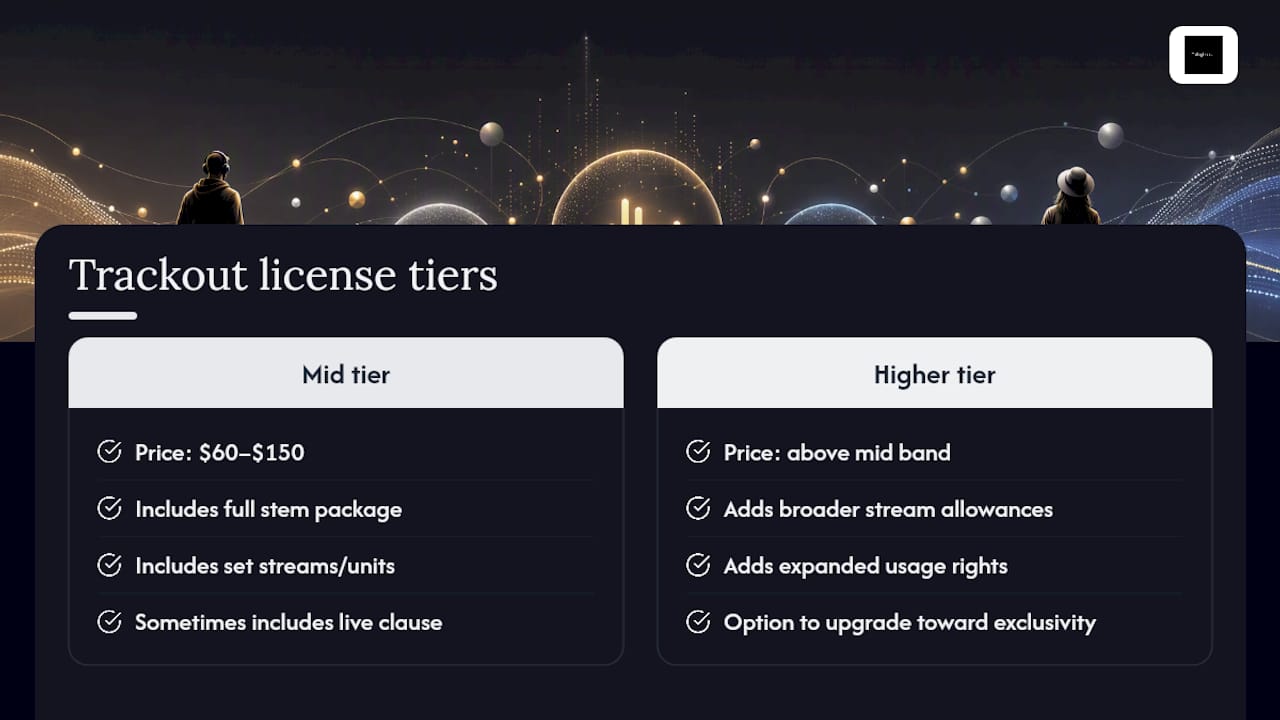
Trackout licenses generally sit in a mid price band among licensing options, often landing between roughly $60 and $150 depending on the producer and platform, according to pricing data from beat retailers. That price usually buys you the full stem package plus a set number of streams or units, sometimes bundled with a live performance clause.
Higher-priced tiers typically add broader stream allowances, expanded usage rights, or an option to upgrade toward exclusivity later. When you’re comparing offers, weigh the price against what you actually need this release to do, not just the sticker number.
Contract Red Flags and Questions to Ask Before You Pay
A few clauses separate a fair trackout license from one that’ll cost you later, and asking about them upfront is normal, not confrontational.
- Ask about exclusivity status. Confirm in writing that the license is non-exclusive unless you’re specifically paying for an exclusive buyout.
- Confirm stream or usage caps. Get the exact number, not a vague “unlimited for personal use” phrase that leaves commercial release ambiguous.
- Clarify credit and royalty requirements. If a songwriting split or producer royalty applies, get the percentage and the trigger event in the agreement text, not a verbal promise.
- Watch for broad ownership language. A red flag is any clause implying the producer retains rights to your finished vocal recording, not just the underlying beat.
- Request amended wording if terms are unclear. Most independent producers will adjust ambiguous language, like “unlimited streams” without a defined platform, if you ask before purchase rather than after a dispute.
When Tellingbeatzz Recommends Trackouts
We point artists toward a trackout license the moment a professional mix or catalog-building strategy is actually on the table, not before. Trackout options are structured with separated WAV stems, clear file labeling, and licensing terms spelled out at checkout, so there’s no guesswork once the download lands.
Start with what your current release needs, not what sounds impressive. Upgrade when a real milestone, a stream cap, a placement, a label conversation, actually arrives.
— Thomas
Get Trackout-Ready Beats Straight From Tellingbeatzz
Independent artists have access to trackout-enabled beats without the back-and-forth of chasing down a producer for stems after the fact. Beat packs can be built with MP3, WAV, or full trackout files at checkout, paired with licensing and instant download, so an engineer has everything needed the moment a session starts.
Before you check out, confirm three things on the product page: the exact file formats included, whether the license is non-exclusive or offers an exclusivity upgrade, and what usage terms apply to your planned release. Browse the current catalog of hip-hop and R&B instrumentals and pick the trackout option that matches where your project actually is, not where you hope it ends up.
Primary Sources and Sample License Pages
- Beat License / Lease Type Comparison, a pricing chart across license tiers
- Image-Line (FL Studio), a DAW reference for exporting and importing stems
- Portland, unrelated construction usage of “trackout”
Sources
FAQ
Can you legally own a beat?
Only through an exclusive purchase with a formal rights assignment. A trackout license, like most beat licenses, is non-exclusive, meaning the producer retains ownership and can license the same beat to other artists.
What happens if I use a beat I didn’t pay for?
You risk a copyright claim, takedown, or monetization dispute once the song gains any traction, since the producer retains rights to unlicensed use. Platforms increasingly flag unlicensed beats through audio recognition before a release even gets traction.
What does “trackout lease” mean?
A trackout lease, more accurately called a trackout license, grants you the individual stem files behind a beat under non-exclusive terms, letting an engineer remix or rearrange elements that a standard stereo lease locks together.
Is it smart to lease a beat?
For most independent artists, yes. A lease lets you test a song’s reception and commercial potential before committing to the higher cost of a trackout or exclusive purchase, and you can upgrade later if the track earns it.

No Comments