

WAV vs. MP3: The Real Difference for Producers and Artists
WAV preserves the original PCM data captured at recording; MP3 discards a portion of that data to shrink file size. The one-sentence rule: use WAV for anything you’re producing, mixing, or archiving, and use MP3 for anything you’re distributing or sharing. Once you understand what each format keeps and throws away, the choice stops feeling technical and starts feeling obvious.
Two quick definitions ground everything that follows:
- Lossless (WAV): every sample recorded is stored and retrieved exactly as captured, at rates like 44.1 kHz or 48 kHz and depths like 16-bit or 24-bit.
- Lossy (MP3): an encoder removes audio information it calculates you’re least likely to hear, then stores what’s left at a chosen bitrate, commonly 128 to 320 kbps.
Tellingbeatzz builds its entire delivery philosophy around this distinction, offering artists MP3, WAV, and full trackout options so the format serves the job rather than the other way around.
Key Takeaways
WAV preserves every recorded sample for production and archiving, while MP3 at 320 kbps delivers near-transparent sound at a fraction of the file size for distribution.
| Point | Details |
|---|---|
| Use WAV for production | Record, edit, mix, and master in lossless WAV or FLAC to protect headroom through every processing pass. |
| Reserve MP3 for delivery | Export MP3 only at the final distribution stage, ideally at 256 to 320 kbps for music. |
| High bitrates are hard to detect | Blind tests show listeners often can’t distinguish 256 to 320 kbps MP3 from WAV on typical material. |
| MP3 to WAV doesn’t restore quality | Converting a compressed file back to WAV just adds padding around data that’s already gone. |
| Deliver lossless to distributors | A WAV or FLAC master produces better platform encodes than submitting a pre-compressed MP3. |
Table of Contents
- MP3 vs. WAV: The Technical Difference That Drives Everything Else
- Can You Actually Hear MP3 vs. WAV in a Blind Test?
- MP3 320 vs. WAV: What the File Size Actually Buys You
- The Workflow Every Producer Should Follow
- Myths That Waste Studio Time
- How Tellingbeatzz Applies These Rules in Practice
- What Actually Matters When You’re Choosing a Format
- Frequently Asked Questions
- Sources
MP3 vs. WAV: The Technical Difference That Drives Everything Else
The gap between these two formats isn’t a matter of branding or preference. It’s arithmetic. WAV is a container for PCM (Pulse Code Modulation) data, meaning every single sample recorded by a microphone or output by a digital instrument gets stored, untouched, exactly as measured. Open a WAV file, and you’re looking at bit-perfect audio. Nothing has been guessed at, approximated, or discarded.
MP3 works on an entirely different principle. Its encoder applies a psychoacoustic model, a set of assumptions about which frequencies and transients the human ear is unlikely to notice, especially when louder sounds mask quieter ones nearby. The encoder strips out what it predicts you won’t miss, then compresses what remains into a target bitrate. MP3 encoding trades a large share of raw PCM data for a smaller file, and how much gets sacrificed depends entirely on the bitrate you choose.
Two other variables shape how much detail a file can hold in the first place, independent of format:
- Sample rate (44.1 kHz vs. 48 kHz) determines how many snapshots of the waveform are captured per second. 44.1 kHz has been the CD and music-distribution standard for decades; 48 kHz is standard in video and broadcast work. For music production, the practical audible gap between the two is minimal.
- Bit depth (16-bit vs. 24-bit) determines how finely each snapshot’s volume is measured. 16-bit audio provides roughly 96 dB of theoretical dynamic range, while 24-bit offers substantially more headroom, which matters most while you’re recording, layering plugins, and riding gain, not necessarily on the final listen.
That headroom is where bit depth earns its keep. During mixing, you’re stacking EQ moves, compression, and reverb tails on top of each other, and each process introduces a small amount of rounding error, called quantization noise. Working in 24-bit keeps that noise so far below the signal that it never becomes audible, even after dozens of processing passes. Drop to 16-bit too early, and those errors have less room to hide.
A useful number to keep in mind: a WAV file sampled at 44.1 kHz and 16-bit stores roughly 1,411 kilobits of data per second of audio, uncompressed. Compare that to a 320 kbps MP3, and you can see instantly why the compressed file is a fraction of the size, and why something has to give.
Where does the technical advantage of WAV actually matter in practice?
- Recording: capturing at 24-bit gives you a safety margin against clipping and noise during tracking.
- Editing and comping: cutting, layering, and time-aligning stems works best on uncompressed audio, where every edit point is exact.
- Mastering: compression, limiting, and EQ moves compound rounding errors, so lossless headroom protects the final print.
- Archiving: a master file you’ll return to in five years should never have already lost information it can’t get back.
Can You Actually Hear MP3 vs. WAV in a Blind Test?
Here’s where a lot of forum arguments go sideways. The technical differences above are real and measurable, but that doesn’t automatically mean your ears can catch them, and controlled testing backs that up. In many blind and AB listening tests, listeners cannot reliably distinguish a 256 to 320 kbps MP3 from its source WAV on typical playback systems and typical material. Similar public AB tests comparing high-resolution files against compressed files have produced near-chance results, meaning listeners guessed correctly about as often as flipping a coin would predict.
That doesn’t mean MP3 is flawless at every bitrate. It means the artifacts become audible under specific, identifiable conditions:
- Pre-echo, a faint smearing that appears just before a sharp transient like a snare hit or cymbal crash, most noticeable at lower bitrates.
- Stereo imaging collapse, where a wide, detailed mix narrows and loses spatial precision, more common below 192 kbps.
- High-frequency smearing on cymbals, hi-hats, and sibilant vocals, where the encoder has the least room to preserve detail.
Material matters as much as bitrate. A dense trap beat with layered 808s and stacked hi-hats tends to mask compression artifacts because there’s already so much going on. A sparse acoustic guitar and vocal recording exposes them instantly, because there’s silence and detail with nowhere to hide. Your playback chain matters too: a phone speaker will never reveal what a treated room and studio monitors will.
Pro Tip: Run your own AB test in five minutes. Export the same 30-second section as WAV and as a 128 kbps MP3, load both into your DAW, level-match them by ear, then play them back to back with your eyes closed on studio monitors or good headphones. At 128 kbps, most people catch it. At 320 kbps, most people don’t.
For that test to mean anything, it has to be double-blind, meaning neither you nor whoever’s switching the files knows which one is playing at any given moment. Expectation bias is powerful. If you know you’re listening to the “cheap” file, you’ll often talk yourself into hearing problems that aren’t there.
MP3 320 vs. WAV: What the File Size Actually Buys You
The tradeoff comes down to a simple question: how much storage and bandwidth are you willing to spend for how much extra fidelity? A four-minute song in 16-bit/44.1 kHz WAV runs about a few tens of megabytes, while the same track at 192 kbps MP3 shrinks to a small fraction of that size, and at 320 kbps is somewhat larger but still significantly smaller than WAV.
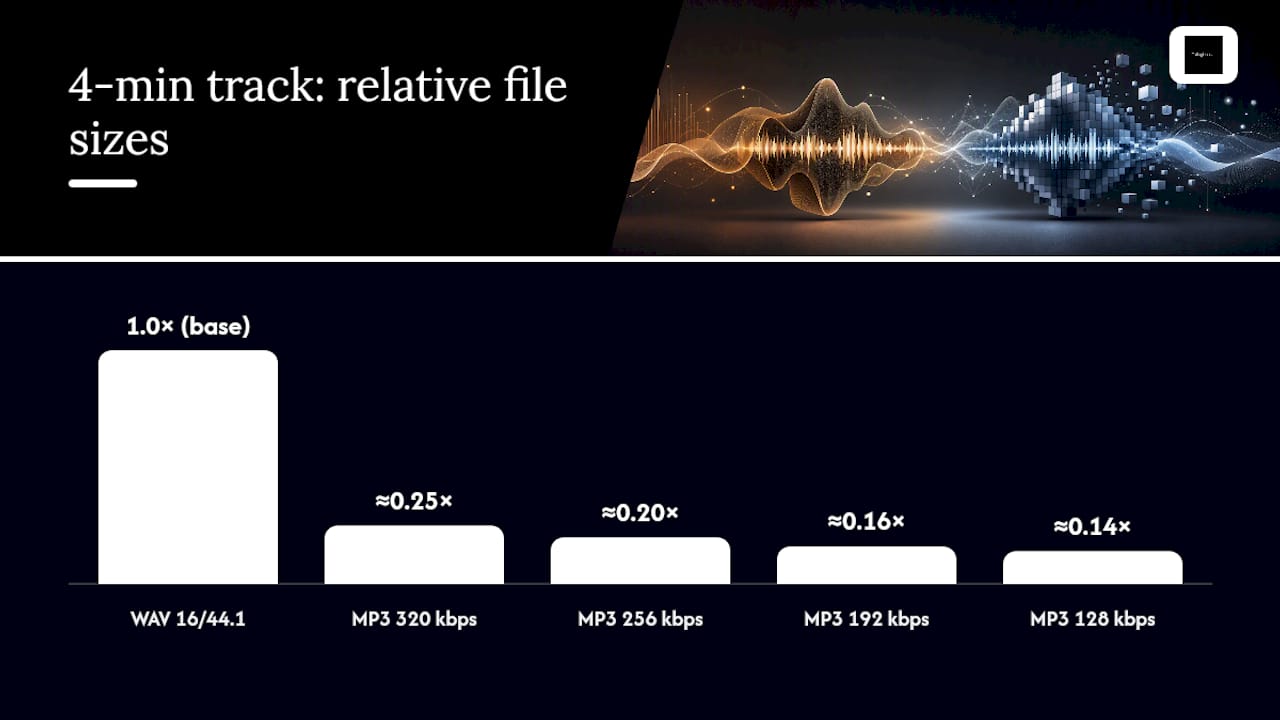
That’s a four to seven times reduction in size depending on which MP3 bitrate you pick, and for most listening scenarios, the sacrifice at the top end of that range is close to invisible.
So how do you pick a number? For podcasts, where the content is mostly speech, 128 to 192 kbps is plenty, since spoken word has far less high-frequency detail to protect than music. For music distribution to streaming platforms and download stores, 320 kbps is the sensible floor if you’re delivering MP3 at all, though most platforms actually prefer a lossless master and re-encode it themselves. For offline personal libraries where storage is genuinely tight, such as an older phone with limited space, 256 kbps sits at a smart middle ground between size and fidelity.
The savings only make sense once you weigh them against your actual bottleneck. If you’re uploading hundreds of stems to cloud storage, MP3’s compression is a real convenience. If you’re handing a final master to a mastering engineer or a distributor, that same compression is throwing away information you paid studio time to capture.
The Workflow Every Producer Should Follow
Confusion about MP3 vs. WAV usually isn’t about the science. It’s about not having a clear rule to follow at each stage of a project. Here’s the framework that removes the guesswork:
- Record in WAV, 24-bit, at your session’s native sample rate (44.1 kHz for most music work, 48 kHz if you’re scoring to video). The extra headroom protects you from clipping and gives quiet processing room to breathe.
- Edit and comp in WAV. Every cut, crossfade, and time-stretch performs better on uncompressed audio, where there’s no compression artifact for the edit to expose.
- Mix and master in WAV or FLAC. Compression and limiting stack rounding errors with every plugin pass, so start each session from a lossless source.
- Archive your final master as WAV or FLAC, never as MP3. This is the file you’ll return to in a year when a platform needs a different format or a remix request comes in.
- Export MP3 only at the final distribution step, and only when the destination specifically calls for it.
That last step is where a lot of independent artists shortcut themselves. Delivering a lossless WAV or FLAC master to a distributor produces better platform encodes than handing over an MP3, because the distributor’s own encoder can work from full information instead of re-compressing an already-compressed file, a process that stacks generational loss on top of generational loss. If you’ve ever wondered why a track sounds slightly duller after passing through multiple platforms, this is often the reason.
On the metadata side, keep your artist name, track title, BPM, and key consistently tagged before export. MP3’s ID3 tag system handles this cleanly for shared or downloaded files, while WAV supports more limited metadata, so tag at the WAV stage when your DAW allows it, then confirm the tags carried over after your MP3 export.
Pro Tip: Name your WAV master files with a version number and date before you export MP3 copies. When a client or collaborator asks for “the file” six months later, you’ll know instantly which lossless master is the real one.
Myths That Waste Studio Time
A few persistent misunderstandings about these formats cost creators real quality, and they’re worth clearing up directly.
- Converting an MP3 to WAV does not restore lost quality. The encoder already discarded that data permanently. Re-wrapping the file in a WAV container just adds padding around information that isn’t there anymore.
- WAV’s technical superiority isn’t always audible in practice. On a dense, loud mix played through a phone speaker, the gap between WAV and a well-encoded 320 kbps MP3 often disappears entirely for the listener.
- Repeatedly re-exporting MP3 from MP3 compounds damage. Each pass through a lossy encoder adds new artifacts on top of the last, which is why a lossless master should always be the source you return to.
- MP3’s richer tagging doesn’t make it the better archive format. MP3 supports more flexible ID3 metadata than WAV, which is convenient for a personal library, but tagging convenience has nothing to do with audio fidelity.
How Tellingbeatzz Applies These Rules in Practice
Format decisions aren’t theoretical for a catalog built on trust. Tellingbeatzz’s beat licensing reflects the exact workflow outlined above, applied to a library of more than 600 instrumentals streamed over 200 million times.
- Every license option includes MP3, WAV, and full trackout files, so an artist can choose the format that matches their next step, whether that’s a rough reference or a final master.
- Masters are kept and delivered in lossless quality, giving artists the same headroom producers rely on during mixing and mastering.
- Licensing terms are disclosed transparently, so artists always know exactly which files and rights they’re getting before they check out.
- Every purchase carries unlimited commercial rights, meaning the format you choose never limits what you can release or how widely you can distribute it.
That combination, format flexibility paired with clear rights, is what turns a technical decision into a practical advantage for independent artists.
What Actually Matters When You’re Choosing a Format
Most advice on this topic gets one thing backward: it treats WAV as automatically “better” and MP3 as a compromise you settle for. That framing misses the point. WAV isn’t better, it’s unprocessed. MP3 isn’t worse, it’s optimized for a job WAV was never designed to do, which is moving audio efficiently across the internet.
The conventional wisdom that “real audio people only use WAV” is closer to superstition than practice. Every major streaming platform re-encodes your upload anyway, so obsessing over your personal listening format while ignoring your session’s bit depth is solving the wrong problem. The gap that actually costs artists quality happens earlier, in the studio, when someone masters from an MP3 they downloaded off a group chat instead of asking for the WAV.
If there’s one thing to prioritize first, it’s this: protect the lossless file at every production stage, and stop worrying about what format the final listener hears it in. Their ears, their system, and the platform’s own encoder will decide that part for you.
Frequently Asked Questions
Is there an audible difference between MP3 and WAV?
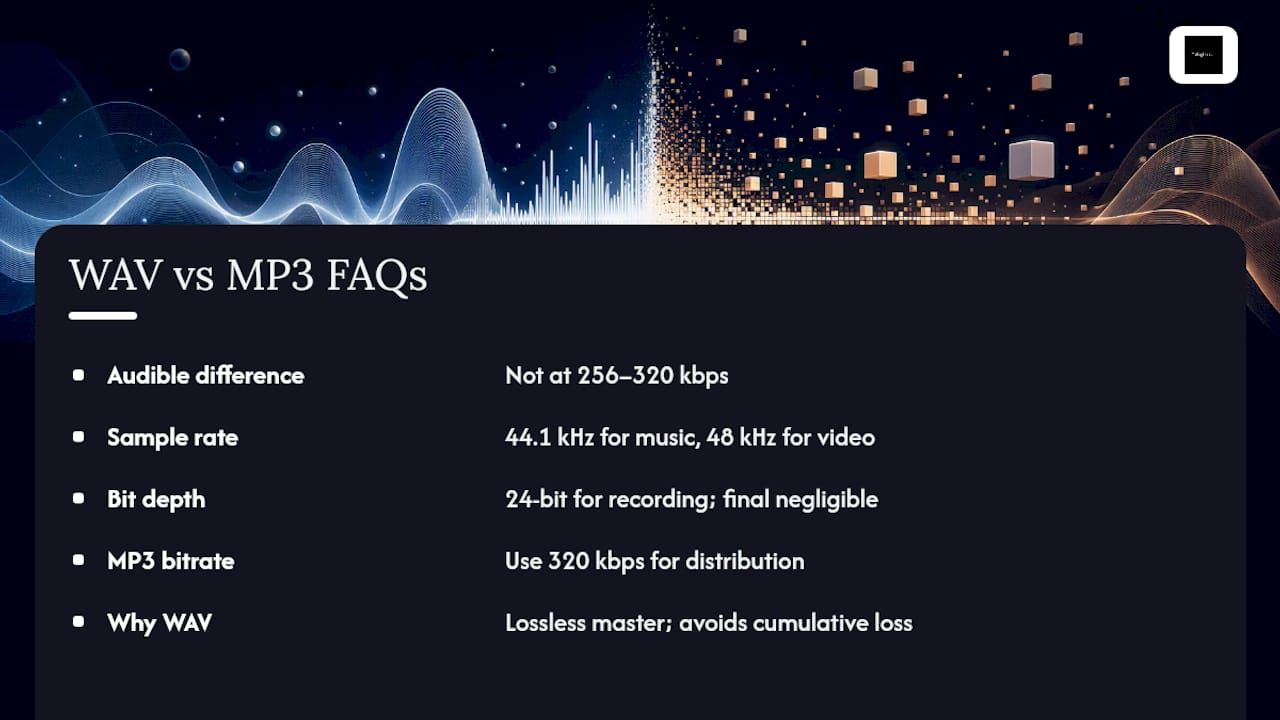
At high bitrates like 256 to 320 kbps, most listeners cannot reliably tell them apart in controlled listening tests. The gap becomes noticeable mainly at lower bitrates, on sparse acoustic material, or through revealing studio monitors and headphones.
Should I use 44.1 kHz or 48 kHz for my project?
Use 44.1 kHz for music intended for streaming and CD-style distribution, since it’s the long-standing industry standard. Use 48 kHz if your project is headed to video or broadcast, where it’s the native rate.
Is 24-bit audio worth using over 16-bit?
Yes, during recording and mixing, because the extra headroom keeps quantization noise inaudible through heavy processing. For final listening, the practical difference between the two is often negligible.
What MP3 bitrate should I use for beats or final masters?
320 kbps is the sensible floor for music you’re sharing or selling, since it sits close to the transparency threshold most listeners can’t cross in blind tests. Anything lower risks audible artifacts on complex mixes.
Why do professionals still record and mix in WAV if MP3 sounds fine?
Because MP3’s data loss is permanent and compounds with every re-export, while WAV gives you a stable, lossless source to return to for remixes, remasters, or new platform encodes. Tellingbeatzz keeps its own catalog structured this way, supplying WAV and trackout files alongside MP3 so artists always have the higher-quality source available.
No Comments