

Producers & Artists: Beat Content ID Disputes Resolved in 24–72 Hours
If a beat triggers a Content ID claim, dispute it right away using your license and delivery records. Most claims only affect monetization, never your channel’s standing, and the process rewards speed. The claimant has 30 days to respond to a dispute, and an appeal shortens that window to 7 days, so a well-documented dispute filed early tends to resolve fastest and recovers the most held revenue.
TL;DR:
- Most Content ID claims for beats are triggered by supplier registration or auto-enrollment, not by actual copyright infringement, so early dispute with proper licensing proof is crucial.
- Disputing a claim quickly within five days and attaching clear licensing documentation increases the chance of recovering monetized revenue before the claim is released.
- Content ID operates as an automated database match, meaning claims often reflect registration conflicts rather than legal ownership disputes, which can be resolved with professional documentation.
- Ensuring licenses explicitly clarify Content ID rights and verifying registration status with distributors before upload helps prevent false claims and unnecessary disputes.
- Escalate to appeal only when confident that your license and ownership proof are airtight, as counter-notifications carry legal risks and should involve distributor or legal counsel.
Table of Contents
- Content ID Disputes for Beats: Your First 24 to 72 Hours
- What Content ID Is and How It Differs From a Copyright Strike
- Why Beats Trigger Content ID Claims: Common Scenarios
- License Tiers and Content ID Rights: What They Actually Mean
- How to Dispute a Content ID Claim Step by Step
- How to Avoid Content ID Claims Before You Release
- When to Escalate: Appeals, Counter-Notifications, and Real Risk
- Publisher Perspective: Why Documentation Wins Disputes Faster
- Get Beats With Licensing That Holds Up Under a Dispute
- Sources
Content ID Disputes for Beats: Your First 24 to 72 Hours
Speed matters more than perfection here. The moment you see a claim, work through this sequence before the window closes on recoverable ad revenue.
- Open YouTube Studio, go to Content, click See details on the claimed video, and note the claimant’s name, the matched audio timestamps, and the policy applied (monetize, track, or block).
- If you have clean license proof, click Dispute and attach it. For a blocked video where you’re confident in your rights, use Escalate to appeal instead, since it starts the clock on the shorter 7-day claimant window.
- Reach out to the beat’s producer and your distributor’s rights team in parallel. Ask them to release the reference asset or correct a registration error on their end.
- If anything about your rights is unclear, don’t gamble on a risky appeal or counter-notification. Pause and confirm ownership with your distributor, or talk to an attorney if real money is on the line.
This isn’t a full resolution. It’s triage, and it buys you time to build a stronger case in the sections below.
What Content ID Is and How It Differs From a Copyright Strike
Content ID is an automated matching system, not a court. YouTube’s system scans uploaded audio against a database of registered reference files and flags matches instantly, with no human reviewing your specific case at the point of the claim. That distinction shapes everything about how you respond.
A claim applies one of three policies: monetize (ads run, revenue often splits or redirects to the claimant), track (just data collection, usually invisible to viewers), or block (the video goes dark in some or all countries). None of these three touches your channel’s standing. A copyright strike, by contrast, only follows a formal takedown request, and repeated strikes can suspend monetization privileges or terminate a channel entirely, per YouTube’s copyright basics.
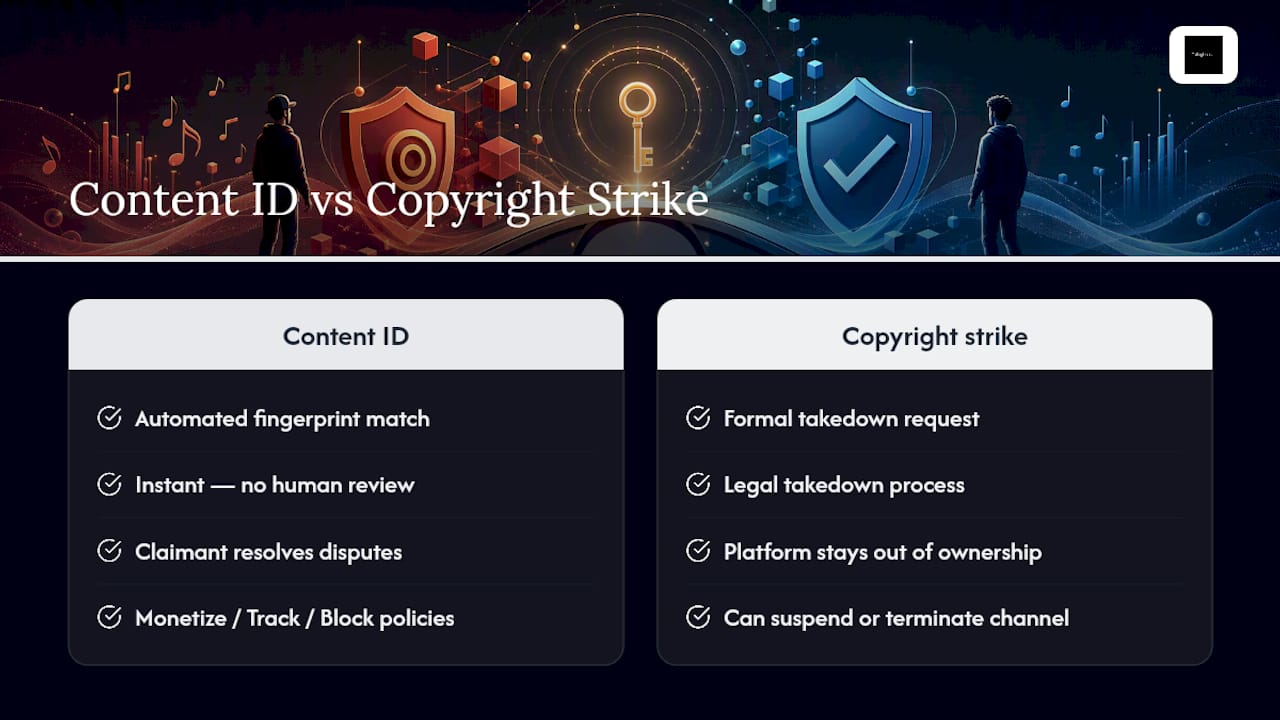
Here’s the part that surprises a lot of producers and artists: YouTube does not adjudicate who actually owns the beat when you file a dispute. The platform passes your dispute to the claimant, and the claimant decides whether to release the claim, reject it, or let it expire. YouTube stays out of the ownership question entirely unless a formal legal takedown and counter-notification enter the picture.
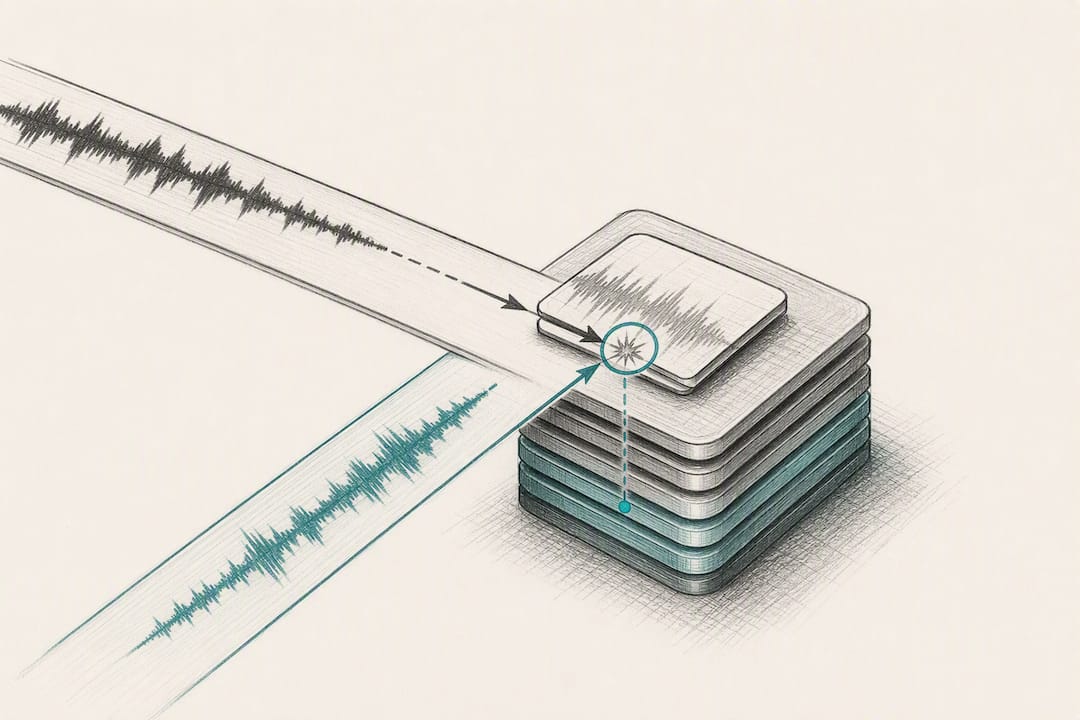
This is also why a fully licensed artist can still get claimed. Content ID runs on a first-registration basis, meaning whoever uploads a reference file first effectively “owns” the fingerprint in the system, regardless of who’s actually entitled to license it downstream. If a producer, a sample library, or even a rival distributor registers a sound before you distribute your track, you can get matched even though your paperwork is spotless. Understanding that mechanic changes how you read a claim. It’s often not a legal accusation. It’s a database collision, and your job is to prove your side of the paperwork faster than the automated system assumes bad faith.
Why Beats Trigger Content ID Claims: Common Scenarios
Most beat related claims trace back to one of five patterns. Knowing which one applies to you determines whether you dispute, contact your distributor, or just wait it out.
- The producer or their distributor registered the beat first. Once a reference file exists in Content ID, any later upload using that instrumental gets flagged automatically, even from someone who bought a legitimate license.
- Your distributor auto-enrolled your release into Content ID. Many distribution platforms opt tracks into Content ID by default during upload, and if your release contains a leased beat, that setting can trigger a claim against you or, worse, let you accidentally claim someone else.
- The beat is a non-exclusive lease used by multiple artists. Leased beats are sold to many buyers by design, so no single purchaser can safely register the track in Content ID without falsely claiming everyone else who bought the same license.
- Shared sample packs or common loops create false matches. If your beat pulls from a widely distributed drum kit or loop pack, the fingerprint can overlap with thousands of other uploads that used the same source material.
- A manual claim was filed in error or in bad faith. Someone using YouTube’s Manual Claiming tool can flag your video directly, sometimes by mistake, occasionally out of malice, and this route needs the same dispute process as an automated match.
Practitioner reports back up the first scenario as one of the most persistent traps: auto-enroll settings at distributors catch artists who never realized their release was opted into Content ID at all. Check your distribution dashboard before you upload, not after a claim lands.
License Tiers and Content ID Rights: What They Actually Mean
Not every beat license grants the same rights inside Content ID, and confusing the tiers is where a lot of disputes get born. Here’s how the three common categories break down in practice.
- Non-exclusive leases almost never include the right to register the beat in Content ID. The producer typically retains that right and sells the same beat to other artists, so if you register a leased instrumental yourself, you risk falsely claiming every other artist who legally bought the identical license.
- Unlimited-use licenses expand how widely you can stream or monetize a track, but that expansion doesn’t automatically include Content ID registration rights unless the license explicitly says so. Read the actual clause. Don’t assume “unlimited” means “exclusive.”
- Exclusive licenses transfer master-use rights to you and usually do permit registration. Even then, conflicts can surface if the beat was previously registered under a different account, since the fingerprint database doesn’t automatically update just because ownership changed hands.
Pro Tip: Before you register anything in Content ID, confirm with your distributor’s rights team that no prior reference file exists for that beat. A five-minute check now avoids a multi-week dispute later.
To prove an exclusive transfer actually happened, you need three things on file: a signed exclusive agreement naming the specific beat, dated delivery records showing when the producer sent the trackout files, and updated registration records with your distributor reflecting the new rights holder. Missing any one of these turns a legitimate exclusive purchase into a claim you can’t fully substantiate.
How to Dispute a Content ID Claim Step by Step
The dispute process rewards precision. Rush it and you’ll get rejected on a technicality; drag it out and you lose recoverable revenue. Here’s the sequence that actually works.
- Open the claim details in YouTube Studio. Record the claimant’s name, the exact matched audio timestamps, and which policy is active, monetize, track, or block, since your evidence needs to address the specific match, not just the general fact that you licensed a beat.
- Click Dispute and select the correct legal basis. Your honest options are typically “I have a license,” “This is a misidentification,” or occasionally fair use. Pick the one that’s actually true. Misrepresenting your basis is the fastest way to a rejected dispute or worse.
- Attach every document you have. That means the license PDF, your purchase invoice, a signed split sheet if collaborators are involved, the track’s ISRC or ISWC codes, distribution confirmation, and, if relevant, email correspondence with the producer.
- Watch your timing. Filing within roughly five days of the claim maximizes how much held ad revenue you can recover if the claimant releases it. If the video is fully blocked and you’re confident in your paperwork, Escalate to appeal instead of filing a standard dispute first, since that route shortens the claimant’s response window to 7 days rather than 30.
- Track the outcome and plan your next move. The claimant can release the claim (you regain monetization and any held revenue), reinstate it (you can appeal), or, in rare and serious cases, escalate to a formal takedown request, which carries real copyright strike risk.
Claimant response windows: initial dispute, 30 days; appeal, 7 days. If the claimant takes no action within either window, the claim releases automatically in your favor.
Most disputes never make it past step 5’s first outcome. A licensed artist with real documentation attached tends to get a release, not a fight, because the claimant’s rights-management team has no incentive to contest a legitimate license once they see it in writing.
How to Avoid Content ID Claims Before You Release
Prevention beats disputing every time, and most of the work happens before you ever hit upload.
Start by confirming Content ID language directly with the producer before you buy a beat. A reputable seller will state plainly whether the license allows registration, and that single question eliminates a huge share of downstream confusion.
- Check your distributor’s upload settings and disable auto-enroll into Content ID for any release built on a leased beat.
- Keep one organized folder per release containing the license PDF, invoice, trackout stems, and ISRC, with a consistent rights holder name across every document.
- Use a signed split sheet and accurate ISRC or ISWC codes, and make sure your distributor and CMS metadata match exactly, since mismatched metadata is one of the top causes of avoidable disputes.
- If you’re a producer selling beats, never register a non-exclusive lease in Content ID, and document any exclusivity transfer in writing the moment it happens.
Pro Tip: Name your files consistently across every platform, license PDF, invoice, and distributor upload, using the same track title and artist name. Mismatched naming is a quiet but common trigger for manual review delays.
A clean folder sounds like busywork until the day a claim lands and you can attach every document in under two minutes instead of scrambling through email threads at midnight.
When to Escalate: Appeals, Counter-Notifications, and Real Risk
Escalation exists for a reason, but each rung up the ladder raises the legal stakes. Know what you’re actually signing up for before you click.
If a claim blocks your video entirely, Escalate to appeal compresses the claimant’s response time to 7 days instead of the standard 30, which can matter enormously for a time-sensitive release. Use it only when your documentation is airtight, since a rejected appeal on a blocked video puts you closer to a formal takedown scenario.
If the claimant rejects your appeal, your next option is a counter-notification, a formal legal step that essentially dares the claimant to either sue you or withdraw the claim entirely.
A counter-notification is not a dispute button. It’s a legal declaration under penalty of perjury that you have the right to use the content, and filing one without solid grounds exposes you to real legal liability if the claimant decides to pursue it.
That’s why misusing the dispute or appeal process carries genuine consequences, including takedown requests and, in repeated cases, channel-level strikes. If real money or a contested ownership question is involved, loop in your distributor’s or CMS partner’s rights-management team before you file anything yourself. They often have direct escalation channels with claimants that resolve disputes faster, and with far less legal exposure, than a solo counter-notification ever could.
Publisher Perspective: Why Documentation Wins Disputes Faster
Every dispute we’ve watched play out comes down to one variable: how fast an artist can produce clean paperwork. That’s the entire game.
At Tellingbeatzz, every purchase generates an instant license PDF with clear language about what you’re allowed to do, including where Content ID rights stand for that specific license tier. We built it that way because a beat is only as useful to an artist as the paperwork behind it. A great instrumental with murky licensing terms is a liability waiting to surface the moment a video starts gaining traction.
Our advice to any artist facing a claim is simple: store your license PDF, invoice, and stems in one folder tied to the release’s ISRC, and treat that folder as non-negotiable before you ever hit publish. When a claim does land, contact the beat provider and your distributor together, not separately. Coordinated evidence, where the producer confirms the sale and the distributor confirms the release simultaneously, resolves claims noticeably faster than an artist disputing alone with no backup from either party. The licensing and content creation choices you make at the moment of purchase are the same choices that determine how painless a dispute becomes six months later.
— Thomas
Get Beats With Licensing That Holds Up Under a Dispute
Tellingbeatzz exists so a Content ID claim never turns into a revenue crisis. Every purchase comes with an instant license PDF and unlimited commercial rights spelled out in plain language, so when a claim lands, you’re not digging through old emails looking for proof; you already have it.
That documentation is the entire point. Transparent licensing turns a stressful claim into a two-minute dispute filing, and it’s the single biggest factor in whether a video stays monetized or goes dark while a claimant reviews your case. Artists building a catalog on leased or exclusive beats need that certainty before a video ever gets uploaded, not after a claim shows up in Studio. If you have questions about how a specific license tier affects your Content ID standing, our team can walk you through it before you buy. Browse the full catalog of beats with transparent licensing and pick your next release with the paperwork already handled.
Sources
The procedural claims in this guide rest on YouTube’s own documentation, which is worth reading directly since dispute and appeal mechanics occasionally shift. YouTube’s dispute help page lays out the full dispute-to-appeal flow and the exact response windows claimants face. The copyright basics page explains the legal distinction between a Content ID claim and a formal copyright strike, which is the single most misunderstood concept in this entire process. The appeal-specific help article covers how Escalate to appeal changes claimant response timing. When your case involves anything beyond a straightforward licensed beat, consult these pages directly before filing, since YouTube’s own forms and language take priority over any secondhand summary, including this one.
No Comments